Forum Discussion

Modern Lists Missing Ribbon to Add/Edit Items
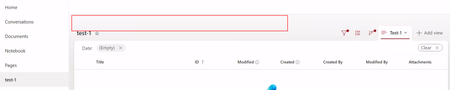

I will also add that I've tested this from different locations, clients, and different browsers with no change in experience. This issue also persists across site collections.

ppinzon , Is anyone else experiencing this issue, or is it just you? Have you deployed any custom solutions or CSS in your tenant?
- ppinzonApr 13, 2026Copper Contributor
This is an issue that everyone experiences. I've even created a separate site collection to test this - no custom CSS, or additional features. Only what's out of the box, and I am still able to replicate the missing ribbon in the modern experience. I can see everything when I switch to the classic experience.
- virendrakApr 13, 2026Steel Contributor
This is strange behavior. I hope you’ve already raised a ticket with Microsoft. I’m also interested to see what the final resolution is.
Are you able to edit items when you select a particular item? Are you able to see the “Edit in grid view” option?
Is this happening with all lists or only newly created lists? Is there any retention policy or label applied that might be preventing the addition or editing of items?
Did you check using F12 to see whether the command bar row is rendering?
If user has read-only rights on list it looks like this