Forum Discussion

Microsoft Flow - Copy files from PC to SharePoint - Error
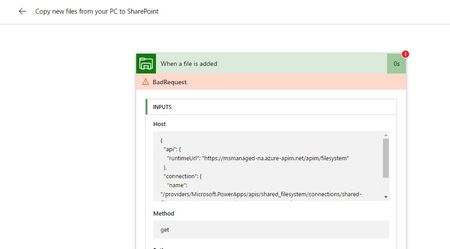
- Jun 02, 2017
We were using this process sucefully for a number of months however it appears FLOW might no longer support this process.
https://powerusers.microsoft.com/t5/Building-Flows/file-system-copy-file-to-SharePoint/m-p/37797#M3447

Hi Stephen
That has worked perfectly thank you - easy when you know how.
You may be able to help with something else related to this Flow. Is it possible to strip an element out of the file name to be used in the flow either by going back to metadata or used to lookup a SQL table.
Sample file name - "DeliveryTicket_PLU0234176_9951_120778.pdf"
The segment PLU0234176 relates to an order number that we could then use to lookup information related to that order.
Thanks
Andrew

- Andrew ReynoldsAug 01, 2017Iron Contributor
- Andrew ReynoldsJul 31, 2017Iron Contributor
Hi Stephen
I see this functionality was released, and the substring command has worked for me to look up the SQL table however the table columns aren’t being listed as dynamic content on the next steps of the Flow.
Previously when the get rows command was used the next item is 'Apply to Each' then select "values" which in the next action step allowed SQL table columns to be selected.
Has there been a change in how to use the output from SQL?
Andrew
1st Image shows current flow and no option to use data returned from SQL
2nd Image shows existing flow with SQL table items used
- Andrew ReynoldsJul 17, 2017Iron Contributor
Thanks Stephen, I will keep a look out for the updates.