Forum Discussion

mhornoloopers
Nov 28, 2022Copper Contributor
I can´t invite external Users
Problem: When I try to invite external users to my Sharpoint site I get the following error: Things I've tried: Checked admin sharepoint policy settings: Checked admin shar...
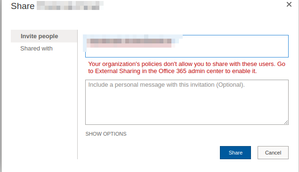
- Nov 28, 2022
Please check the tenant level sharing setting.
1. Open M365 admin center (https://admin.microsoft.com/)
2. Under Settings, click Org settings.
3. Under Services tab, click SharePoint.
4. Check your sharing option.


mhornoloopers
Nov 29, 2022Copper Contributor
1. I'm trying to invite external people (who also have microsoft licenses) to a microsoft sharepoint group (sharepoint then handles page permissions based on that group)
2, I tried sharing it on a team sharepoint site and it did let me for some reason. The one where is not working is not a team site but a communicaiton site, in case that matters
I can also confirm the external user did accept the invite. I can see him as a guest in users
2, I tried sharing it on a team sharepoint site and it did let me for some reason. The one where is not working is not a team site but a communicaiton site, in case that matters
I can also confirm the external user did accept the invite. I can see him as a guest in users
mhornoloopers
Nov 29, 2022Copper Contributor
Closing down this issue because i've tried going into the sharepoint sharing settings again and for some reason instead of allowing external issues as it did when it first tried it was not. I don't really know why but it works now