Forum Discussion

Cannot share a classic SharePoint calendar with External Users
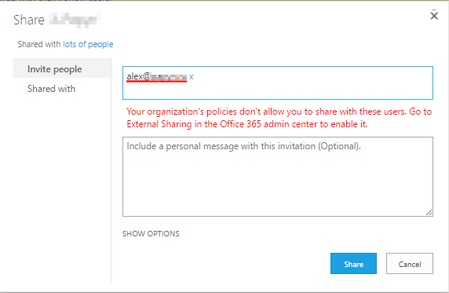

Have you tried creating a SharePoint group and granting access to the user using that group instead?
It could be done by using 'Create Group' button in ribbon by going to Site Settings-> Site Permissions.
Since, you want to grant access to just the calendar, do not specify the group permissions while creating it. Once, the new group is created, add the user to the group and grant the group correct level of access to the calendar.
Hopefully, it will be helpful
Thank you.
Bhavpreet Bains

Hello Bhavpreet,
Indeed I figured out that workaround but the underlying problem remains: it is not possible for us to share calendar directly with some external users.
Because in the meantime I realized it works for some external users (those that are defined as Guests in O365 Admin > Users section...) but not for others.
I triple-checked the settings and we allow sharing with "Authenticated Users" and not with "Authenticated users already existing in the organization directory" (which is the second option).
So it looks like sharing "Modern" List/libraries takes the sharing settings into account, while "Classic" apps only allow sharing with users that are defined as guests.
Seems like a bug to me.
We'll check with our partner how to escalate this to Microsoft since the process seems to be all but customer-friendly...........
Thanks for your help anyway :)
- Bhavpreet BainsJun 21, 2017Iron ContributorHello Benoit,
Yes, it definitely seems like a bug to me. I was able to reproduce the same scenario at my end and got the same error as that of you.
You may create a new service request by going into O365 admin center. Hopefully, they will be able to resolve the issue.
Thank you. AnonymousJun 30, 2017
We found a bug almost two years ago (Sept. 2015) in SharePoint Online when trying to share a calendar with an external user. Our business user wanted to grant access only to the calendar in their SharePoint site to the external users, so we came up with this (admittedly crazy) workaround:
We created a subsite to the site with the calendar, with nothing in it. We then instructed the business users to:
1) Invite the external person to the subsite
2) Confirm that they are able to log in
3) Grant them access to the calendar
It seemed to be related to the initial sharing invitation for new external users, but I'm a little fuzzy on those details.
I did find the email thread with Microsoft support (ticket #115092213185735 ), but the KB article they referenced is no longer available:
Issue: You were seeing invitations to a calendar item fail to send when inviting users for the first time.
Resolution: I explained this has been known to occur for new users when permissions in lists items are unique https://urldefense.proofpoint.com/v2/url?u=https-3A__support.microsoft.com_en-2Dus_kb_2938827&d=AwMFAg&c=5MrMVID9Pd61bTJfp9wNBTxRZN_CiHJui8q3SJEDr28&r=rH_5r9pqFASPwvQ9kq1liWACr8zlp6n51XJP9I6B6Z7qBlsKWel3cAuOanDPJLfw&m=qSYbt8nZac_fIx_QYvRiTYeZ5j0266li0ydewlsXxmo&s=4QnYqVsKv9JWMU9B_8R_cCkEJblGAvxBTx_AmJWxSlE&e=. Though the users can be invited to the entire list/calendar without issue.
 Azam JavaidJun 30, 2017Copper Contributor
Many thanks Kelly.
I read some blog posts suggesting that calendars would not work for External users. However, after carrying out some testing they seemed to work fine.
Appreciate the feedback.
Thanks
Azam