Forum Discussion

Darren O'Leary
Jun 07, 2017Brass Contributor
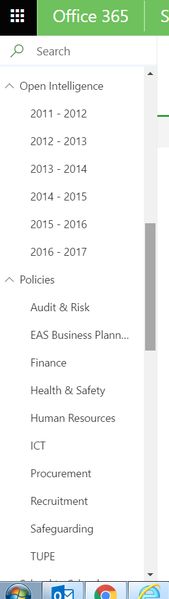
Can you set the Quick Launch Menu as to default as collapsed with Modern Pages?
Hi All, I have a SharePoint site with a large number of subsites, each with their respective document folders. I have transitioned to the new Modern Pages experience, and whilst promising, I note...

Henry Staples
Feb 16, 2018Copper Contributor
I looked into this further. Unless I'm missing something, it seems like I will have to build a small SharePoint app that does the auto-expand capability in the modern UI experience and then deploy across the collection.

Xiangming Yin
Aug 24, 2018Copper Contributor
It's potentially doable, but it's like an "hacking" way to implement it. Additionally, the left navigation is loaded asynchronously, your script will need to try multiple times to test the left navigation is loaded, then click the "expend" icon to expend them. I do think this is not an elegant way to implement it, I'd prefer Microsoft to provide a switch to control the left navigation is expended or collapsed.
 PrashantBMay 11, 2019Copper Contributor
Yes indeed, agree... We need to have the expand and collapse configurable at site level. Every time someone clicks on a sublink the new page is loaded and the menu is collapsed again. It frustrates the user to reopen the menus again and go into sublinks.
This is something very that has to be rectified by Microsoft at the earliest. Really very difficult to live with default collapsed menus.
Regards
Prashant
 Thao Pham-AaltonenDec 06, 2018Brass ContributorAlso, I found the uservoice suggestion and voted on it: https://sharepoint.uservoice.com/forums/329214-sites-and-collaboration/suggestions/34392373-left-menu-submenu-expand-and-or-collapse-default-b
- Thao Pham-AaltonenDec 06, 2018Brass ContributorCompletely agree. We have a lot of new users on SharePoint and many do not notice or realize they can expand the menu by clicking the little icon.