Forum Discussion

Rowell2022
Jul 16, 2024Copper Contributor
Add days to Calculated Columns base on Number of Months
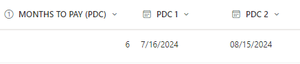
Hi, Please help me with this calculated formula. I am currently creating a sharepoint list for payment monitoring. I have columns: Months to Pay (number), First Payment(date), Second Payment(d...

Rowell2022
Jul 22, 2024Copper Contributor
Hi Expiscornovus,
Will you be able to turn this formula to power automate? My problem is that CALCULATED COLUMNS cannot be call in power automate.
=IF([Months to Pay]>=3,DATE(YEAR([First Payment]),MONTH([First Payment]),DAY([First Payment])+60)," ")
Big thank you.
Will you be able to turn this formula to power automate? My problem is that CALCULATED COLUMNS cannot be call in power automate.
=IF([Months to Pay]>=3,DATE(YEAR([First Payment]),MONTH([First Payment]),DAY([First Payment])+60)," ")
Big thank you.

Expiscornovus
Jul 22, 2024Iron Contributor
Rowell2022 yes, sure.
That would be something like:
if(greaterOrEquals(item()['MonthstoPay'], 3), addDays(item()['FirstPayment'], 60), '')