Forum Discussion

Rowell2022
Jul 16, 2024Copper Contributor
Add days to Calculated Columns base on Number of Months
Hi, Please help me with this calculated formula. I am currently creating a sharepoint list for payment monitoring. I have columns: Months to Pay (number), First Payment(date), Second Payment(d...
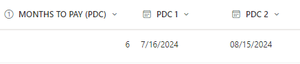

Expiscornovus
Jul 16, 2024Iron Contributor
Rowell2022 you can use the date and day formulas to add number of days.
Below is an example for your setup
In this example I am using the Second Payment date if the months is less than 3 btw. Don't know what you want to use in that case?
=IF([Months to Pay]>=3,DATE(YEAR([First Payment]),MONTH([First Payment]),DAY([First Payment])+60),[Second Payment])
 Rowell2022Jul 18, 2024Copper ContributorHi Expiscornovus
Thank you it worked. But how can I enter the formula for a blank if criteria does not meet.- ExpiscornovusJul 18, 2024Iron Contributor
Rowell2022 if you want to leave it empty you can just use
" "Below is an adjusted example
=IF([Months to Pay]>=3,DATE(YEAR([First Payment]),MONTH([First Payment]),DAY([First Payment])+60)," ")- Rowell2022Jul 19, 2024Copper ContributorYou've helped me a lot, Thank you, Expicornovus!