Forum Discussion

Radiobutton value missing after submission

ganeshsanapSomewhere it does save something, but only visible and to be modified in grid view edit. Inlcuded an image with the formula from Item, which comes with the original dropdown menu items "L2" and "L3".


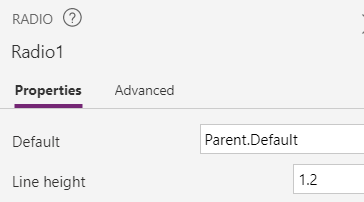
Erikie Try setting Default property of Radio1 to:
Parent.DefaultAfter this change, save the customized form and publish to SharePoint.
Please click Mark as Best Response if my post helped you to solve your issue. This will help others to find the correct solution easily. It also closes the item. If the post was useful in other ways, please consider giving it Like.
 sheila33433Jun 15, 2021Copper ContributorThank you so much! This was the correct answer!!!
- ErikieNov 03, 2020Copper Contributor
ganeshsanap if this is the correct place (see image), than it does not work.....
If i look in the dropdown menu i see: DefaultSelectedItems set to Parent.Default. This item i do not have in the radio button. Can i create this myself?
in the end i set all back to dropdown menu's since the "DefaultSelectedItems" attribute is missing in the radiobutton.....too bad looked more fancy with the radiobuttons..
Regards, Erik