Forum Discussion

Russell Gove
Oct 10, 2016Iron Contributor
Programattically set global Navigation Settinigs in O365 sharepoint
Hi, Is there any way to programattically set the Global navigation settings in Sharepoint Online Can the PnP-Powershell commands set this?

Oct 10, 2016
Take a look at what Publishing assembly in the Client Sided Object Model can do for you: https://blog.vgrem.com/2013/10/22/access-and-manipulate-navigation-settings-via-sharepoint-client-object-model/
 Russell GoveOct 10, 2016Iron Contributor
Thanks Juan, that helped. It can be done using the PNP-Powershell commands:
Connect-SPOnline -Url https://tenant.sharepoint.com/teams/IT/Applications -Credentials o365
$context=get-spocontext
$web=$context.Web

$context.Load($web)
$siteLogoUrl=$web.SiteLogoUrl

$props=$web.AllProperties
$context.Load($props)

$nav=$web.Navigation
$context.Load($nav)

$context.ExecuteQuery();

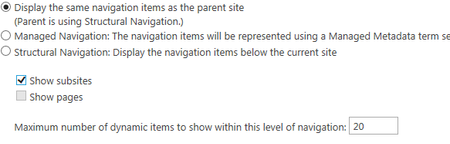
$nav.UseShared=$true #Display the same navigation items as the parent site
$props["__GlobalNavigationIncludeTypes"]=1 #show Subsites
$web.Update()

$context.ExecuteQuery();
- Oct 10, 2016Cool! Glad my advide directed you to a solution :-)