Forum Discussion

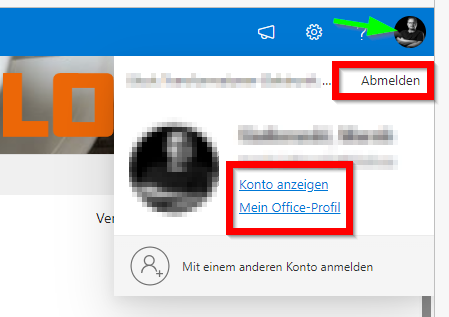
Prevent that user can signout or access profile on a kiosk browser
- Jul 26, 2023
Hi marek_siatkowski,
you could create a site collection app catalog on your site. (https://learn.microsoft.com/en-us/sharepoint/dev/general-development/site-collection-app-catalog)
Then develop an application customizer that injects some CSS in every page and deploy that into the site collection app catalog. (https://learn.microsoft.com/en-us/sharepoint/dev/spfx/extensions/get-started/build-a-hello-world-extension#code-your-application-customizer)
That way the customizer will only affect pages on that site.
But perhaps another solution is much easier. Open the site url in the Browser and append "?env=WebViewList". This will remove the suitebar, the navigation and everything else that is not content. This setting stays even if you navigate to other SharePoint pages, as long as you don't open pages in a new window/tab. But perhaps you can prevent your users from using the right mouse button.
But i think that you might get into some licensing troubles.I don't think there is a kiosk license for SharePoint Online, so you would be using a normal, named license and have multiple people/your whole organisation use that user....That does not sound right.
Best Regards,
Sven

Hi marek_siatkowski,
you could create a site collection app catalog on your site. (https://learn.microsoft.com/en-us/sharepoint/dev/general-development/site-collection-app-catalog)
Then develop an application customizer that injects some CSS in every page and deploy that into the site collection app catalog. (https://learn.microsoft.com/en-us/sharepoint/dev/spfx/extensions/get-started/build-a-hello-world-extension#code-your-application-customizer)
That way the customizer will only affect pages on that site.
But perhaps another solution is much easier. Open the site url in the Browser and append "?env=WebViewList". This will remove the suitebar, the navigation and everything else that is not content. This setting stays even if you navigate to other SharePoint pages, as long as you don't open pages in a new window/tab. But perhaps you can prevent your users from using the right mouse button.
But i think that you might get into some licensing troubles.
I don't think there is a kiosk license for SharePoint Online, so you would be using a normal, named license and have multiple people/your whole organisation use that user....That does not sound right.
Best Regards,
Sven

?env=WebView works even better than I thought.
The license is not an issue, as the site is accessible even to users without any License, just must be in the active directory. I guess that such users have only a minimal level of possible interaction with the sharepoint, but they can klick and read and that is all I need.
And also I have to mention that we have asked this to our Microsoft partner and their official recommendation was just to use any type of cheapest possible named license for this...