Forum Discussion

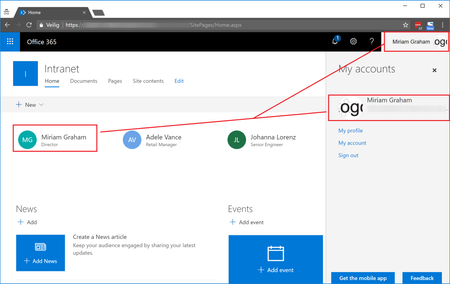
Office 365 Profile picture not displayed inside SharePoint People Web Part on Modern Site Page
- Apr 24, 2018
This issue is fixed now for the customer. Using Microsoft Support, they were able to make required changes serverside which caused the issue for some Office 365 users. For some users specific users attributes were not set, for others they were according to Microsoft, although were not able to change these from our side. Microsoft changed things serverside to handle this. After a serverside sync update, the Office 365 profile pictures also started to display for each user inside the SharePoint People web part on Modern Site Pages.


We did manage to get this issue resolved with the help of Microsoft support. I tried to get a good explanation of what they did behind the scenes so that I could save you all the week and a half of back and forth troubleshooting, but their response (quoted below) was somewhat vague. My best suggestion is to create a support ticket and push front end support to engage the backend team immediately. Good luck!
Issue Definition: SharePoint Online not showing images in people Web part
Resolution:
As there was an issue from the backend server for the SharePoint site we had to involve the component team to get the glitch removed after you are now able to see people's photos in SharePoint Web app.
There were some backend scripts that were run from the backend using a tool to which even we do not have access we have to send a request to the backend team to do the needful hence I would not be able to send you the tool we used to fix the issue.
If you require any further help, please submit a service request from the Office 365 admin center (https://linkprotect.cudasvc.com/url?a=https%3a%2f%2fportal.office.com&c=E,1,qR-yJCzRbYCH0dRvD5R37tG7NTdPoVLTWVMGlUjR2nvY7e5x-u-ptOg5AzUOXlPtfj036wMjMJ5-dyn3ghvW7hd14HYkZUM0NaCBMXEUZQ8ax1UsHcaYlQ,,&typo=1) or contact us at 1-800-636-7914.

took us a few weeks, but our issues were resolved as well, same resolution to Daniel, had to go to a backend queue for them to run script to resolve.
- Pooya ObbohatJul 27, 2020Steel Contributor
JHerschel this issue is back for us and we created a ticket with Microsoft support. It's clearly a bug that hasn't been fixed years later. Microsoft can synchronize the pictures with just a couple of clicks. They either fix the bug or they just fix it when we reach out to them. I'm really disappointed that this still hasn't been addressed and that it takes so much time for me to get them to fix it after creating a ticket.
- JHerschelApr 07, 2020Iron Contributor
not sure if it holds true over half year later, but the workaround was to send this link to users (the SharePoint browsing page):
https://yoursite.sharepoint.com/_layouts/15/sharepoint.aspx
then wait until the next day. Their photo would show up (most of the time)
 Hari_AryanApr 07, 2020Copper Contributor
JHerschelI really appreciate if you help me with the command or the work around for the same.
 mattchowellMar 06, 2019Iron Contributor
This doesn't just affect the modern web part - it's the same issue in classic SP. When you try to render the profile picture, some work, some don't - even though the exact same code is used. Total BS that Msft hasn't got this fixed. Why are they so bad at such basic things?
More context to illustrate just how ridiculous this bug is:
Profile pic from people field shows up in default list view
Same person, same list - the pic doesn't show when the list view is rendered using csr (via jslink)
If I inspect the code output it's EXACTLY the same in both instances, yet in one it works and the other it doesn't.
 Rob OudejansFeb 14, 2019Brass Contributor
I've the same problem. I have created a service request and have daily contact with Microsoft Support about this issue.
UPDATE: I think I've found the solution. A profile picture only shows up in SharePoint if the users visites Delve for the first time.
- Tom AtkinsonFeb 13, 2019Brass Contributor
Thanks for everyone's detailed explanation and suggested actions. We were having precisely the same problem, and it's helpful to know that I haven't gone crazy. Perhaps if enough people reply to this thread, it will spur Microsoft to address the issue globally. #iexperiencedthistoo
