Forum Discussion

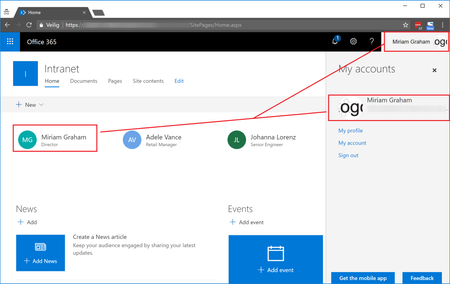
Office 365 Profile picture not displayed inside SharePoint People Web Part on Modern Site Page
- Apr 24, 2018
This issue is fixed now for the customer. Using Microsoft Support, they were able to make required changes serverside which caused the issue for some Office 365 users. For some users specific users attributes were not set, for others they were according to Microsoft, although were not able to change these from our side. Microsoft changed things serverside to handle this. After a serverside sync update, the Office 365 profile pictures also started to display for each user inside the SharePoint People web part on Modern Site Pages.


The only fix that we came up with which is a bit clunky, but works every time:
Once the user’s photo has been uploaded to their O365 profile, in any site newsfeed (I use my SharePoint training site for this): type the following into the newsfeed: “#Testing John Smith” (replace John Smith with your name as the one wanting to fix the issue), then click Post.
What’s happening: The action of their account hashtagging #testing is the part that resolves the issue: Their O365 profile pic wil sync to SharePoint Online and show in the contact section of your site in a few days’ time from the day of hashtagging.
Note: tagging the user’s name here does not the fix the issue but it’s a great way to be notified by email (if you have your newsfeed alerts turned on) of the users who have done this step for you to check in 2 days time when the photo actually appears!
Not ideal as we would prefer a bulk way of doing this but I hope this helps someone!
For ease I place these steps at the end of the steps I provide them for uploading their O365 profile photo, providing the link to the site with the newsfeed.
Cheers,
Jess Wong

We did manage to get this issue resolved with the help of Microsoft support. I tried to get a good explanation of what they did behind the scenes so that I could save you all the week and a half of back and forth troubleshooting, but their response (quoted below) was somewhat vague. My best suggestion is to create a support ticket and push front end support to engage the backend team immediately. Good luck!
Issue Definition: SharePoint Online not showing images in people Web part
Resolution:
As there was an issue from the backend server for the SharePoint site we had to involve the component team to get the glitch removed after you are now able to see people's photos in SharePoint Web app.
There were some backend scripts that were run from the backend using a tool to which even we do not have access we have to send a request to the backend team to do the needful hence I would not be able to send you the tool we used to fix the issue.
If you require any further help, please submit a service request from the Office 365 admin center (https://linkprotect.cudasvc.com/url?a=https%3a%2f%2fportal.office.com&c=E,1,qR-yJCzRbYCH0dRvD5R37tG7NTdPoVLTWVMGlUjR2nvY7e5x-u-ptOg5AzUOXlPtfj036wMjMJ5-dyn3ghvW7hd14HYkZUM0NaCBMXEUZQ8ax1UsHcaYlQ,,&typo=1) or contact us at 1-800-636-7914.
- JHerschelDec 11, 2018Iron Contributor
took us a few weeks, but our issues were resolved as well, same resolution to Daniel, had to go to a backend queue for them to run script to resolve.
 Hari_AryanApr 07, 2020Copper Contributor
JHerschelI really appreciate if you help me with the command or the work around for the same.
- JHerschelApr 07, 2020Iron Contributor
not sure if it holds true over half year later, but the workaround was to send this link to users (the SharePoint browsing page):
https://yoursite.sharepoint.com/_layouts/15/sharepoint.aspx
then wait until the next day. Their photo would show up (most of the time)
 Tom AtkinsonFeb 13, 2019Brass Contributor
Thanks for everyone's detailed explanation and suggested actions. We were having precisely the same problem, and it's helpful to know that I haven't gone crazy. Perhaps if enough people reply to this thread, it will spur Microsoft to address the issue globally. #iexperiencedthistoo
- Rob OudejansFeb 14, 2019Brass Contributor
I've the same problem. I have created a service request and have daily contact with Microsoft Support about this issue.
UPDATE: I think I've found the solution. A profile picture only shows up in SharePoint if the users visites Delve for the first time.
- Jessica WongDec 09, 2018Brass ContributorInteresting, thanks Daniel
