Forum Discussion

LucidBike1140
Apr 05, 2021Iron Contributor
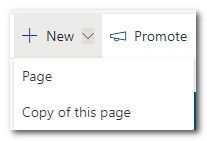
News Post and News Link Missing on "New" Menu
On our intranet's home page, when clicking on the "New" menu item, there is only "Page"and "copy of this page". There should also be options to create a new news post or news link (among others). ...
- Apr 06, 2021How did you create the site? This same thing happened to me when I used ShareGate to copy a site. There was a bug in ShareGate that failed to indicate that the site was a "home page." The bug was subsequently fixed but we found a work-around for the impacted sites. Here's how we fixed the issue: We temporarily made a different page the home page (from Site Pages, using Make home page). Then we re-set the original home page as the home page and all the options returned. Hope that helps!


RobElliott
Apr 05, 2021Silver Contributor
LucidBike1140 if you have a news web part on your intranet homepage then clicking on the dropdown next to Add will give you the News post and News link.
Rob
Los Gallardos
Microsoft Power Automate Community Super User
- LucidBike1140Apr 05, 2021Iron ContributorHi Rob. Agreed. I just cannot understand why it disappeared from the "New" menu. I have users who have been asking me about it. I guess it's something they were used to. Strange that it's gone and strange that it returns when I edit the page, then discard changes, but if I refresh, it's gone again.
