Forum Discussion

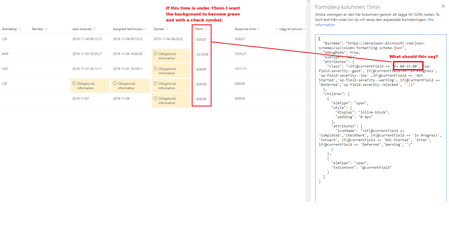
Need help with formating colors based on time in columns
 Nov 08, 2019
I managed with another code to get the result that I wanted, but thanks for the effort!
{
  "$schema": "<a href="https://developer.microsoft.com/json-schemas/sp/v2/column-formatting.schema.json" target="_blank">https://developer.microsoft.com/json-schemas/sp/v2/column-formatting.schema.json</a>",
  "elmType": "div",
  "attributes": {
    "class": "=if(@currentField <= '02:00:00', 'sp-field-severity--good', if(@currentField >= '02:00:00', 'sp-field-severity--blocked', '"
  },
  "children": [
    {
      "elmType": "span",
      "style": {
        "display": "inline-block",
        "padding": "0 4px"
      },
      "attributes": {
        "iconName": "=if(@currentField <= '02:00:00', 'CheckMark', if(@currentField >= '02:00:00', 'Warning', '"
      }
    },
    {
      "elmType": "span",
      "txtContent": "@currentField"
    }
  ]
}
Matti Paukkonen Hello! Those columns are "Calculated" Values
15min has formula:
=TEXT([Assigned technicians]-[case received];"h:mm:ss")
Response time has formula:
=TEXT(Started-[case received];"h:mm:ss")

Here is an example for 15min column, just replace the field references with your fields and add $schema reference in the beginning (editor messes up the links 😞 )
{

    "elmType": "div",
    "attributes": {
      "class":  {"operator":"?",
        "operands":[
            {"operator":"<","operands":[
                "[$assigned]",
                {
                   "operator": "+",
                   "operands": [
                      "[$case]",
                      900000
                   ]
                }]},"sp-field-severity--good",""

        ]}
    },
     "children": [
      {
        "elmType": "span",
        "style": {
          "display": "inline-block",
          "padding": "0 4px"
        },
        "attributes": {
          "iconName": {"operator":"?",
            "operands":[
                {"operator":"<","operands":[
                    "[$assigned]",
                    {
                       "operator": "+",
                       "operands": [
                          "[$case]",
                          900000
                       ]
                    }]},"CheckMark",""

            ]}
        }
      },
      {
        "elmType": "span",
        "txtContent": "@currentField"
      }
    ]
  }
- 288088Nov 06, 2019Brass Contributor
Thanks, I managed to get the color and checkmark, it looks good. But is there anyway to make <0:15:00 it will become green with a checkmark and when >0:15:00 it will become red with a warning symbol?
- Matti PaukkonenNov 07, 2019Iron Contributor
288088, just modify formatting a little bit.
For background color change this:
"sp-field-severity--good",
""
to
"sp-field-severity--good",
"sp-field-severity--blocked"
And for icon
"CheckMark",
""
to
"CheckMark",
"ErrorBadge"
Those out-of-the-box css classes and icons can be found here: https://docs.microsoft.com/en-us/sharepoint/dev/declarative-customization/column-formatting#apply-conditional-formatting
- 288088Nov 07, 2019Brass Contributor
I'm sorry but i'm really new to this, what do you mean by "just modify formatting a little bit" I cant get it to become red or green depending if the minutes are above or below 0:15:00 😞 What line should I format?