Forum Discussion

Jmarti41
Aug 05, 2020Copper Contributor
Need help adding the new item and edit link to a list
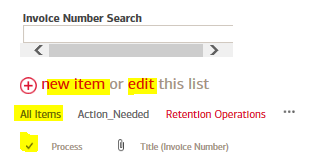
I'm not sure how it disappeared but there's one list in SharePoint that is no longer showing the new item and edit links at the top. (See attached) It's also missing the option to select and deselect entries. Please help on how to get this option added back. Thank you!
Might sound silly and is presumably applicable on classic experience shown lists only,
but which view style is applied to this list?


8 Replies
 Andrew HodgesBronze Contributor
Few things to check -
1. Have your permissions changed? If you have been changed to read only then you wouldn't get the new item option, not sure about the select though.
2. Try viewing the list in modern SharePoint if you are using SharePoint Online.
 Jmarti41Copper ContributorHi Andrew, permissions haven't changed. I'm listed as the Admin of the site. I don't think I'm able to change the view as this is a work website used by multiple users.
- Andrew HodgesBronze Contributor
- Micca0815Iron Contributor
Jmarti41
Somebody might have modified the webpart which shows the list on the page by accident.
Check the gear wheel right hand top side, select edit page and edit the web part for the list.
There is an option available to either show or hide the toolbar.
Selection of individual items could be defined within the current view settings.
