Forum Discussion

Gregi3
Mar 22, 2022Tin Contributor
MS List - Board View - Text Not Showing
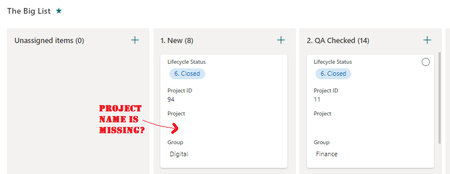
Hello I wonder if anyone has a similar issue or fix. Problem - In my MS Lists, within Board view, the attribute data (i.e. name of the project) isn't showing. This only occurs where I select "...
 May 02, 2022Gregi3 thanks for identifying that! That helps.
LillianJensen just found to help with your issue, that as a workaround if you can go into the List Settings and edit the View from in there (in the Classic way of editing a View) you'll be able to select what data shows on the card, and the order.
If you were doing any filtering you'd be in there anyway, but it's not as nice and user-friendly as the Card Designer, and our newer users won't know about this. So hopefully there's a resolution soon from Microsoft 🙂

Remco111
Aug 05, 2022Copper Contributor
Had the exact same issue with my "Title" field in the Card designer. I assume it has something to do with the fact that this field doubles as a hyperlink to edit the item. As a workaround I've created a formula field called "Card Title" where the formula is simply [Title]. This will always show the same text, and it displays correctly in the Card Designer mode.
 TraciicolliinsFeb 23, 2024Copper Contributor
Remco111 make sure the column is marked at required , meaning can’t be left blank and then see if it shows up