Forum Discussion

Move Modern Page to News feed???
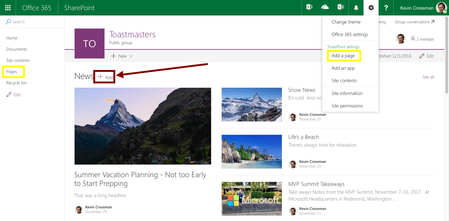

Hi Kevin,
Thanks for reaching out.
We build the news feature as a content distribution system, while the founding piece (each news page) is just a modern site page. The promise of news feature is that we provide a rollup experience, and in the future notification service to deliver news-worthy contents to desired audiences.
Meanwhile, there are other usages of pages - a user can create a site page for any purpose (say, create a page to list out all the team members) and put it anywhere she desires (say, pin to the left nav, link from the site home page using the link web part). This page is not necessarily news-worthy and need to be presented at a prominent place of a site, or delivered to every site memeber via notification service. However, we do envision it will be really easy for one to switch/flip a page to a news page in the near future.
That said, you have a fair point on users getting confused as different +add button delivers the page to different places. Is it a matter of how we name these entry points? If we are more specific than calling it "Add a page", will that help with the case? I just don't think every site page a user created should be pushed to News - which itself might be a surprise to one if her intention is not to add a news page.
Thoughts? Happy to discuss more.
FYI - Alina Skarbovsky

Alternatively, some property you could set on the page to have it roll up into news. Sort of like how you can have:
Web Part Page
Wiki Page
Site Page (modern page)
and...
News Page
- Alina SkarbovskyDec 09, 2016Former Employee
You are right, Kevin and there is indeed a property that defines a page to be news post. That property is however currnetly hidden, but we are working on UX that will allow users to publish any modern page to News, even if it was created from a different entry point.
 DeletedNov 27, 2017Not applicable
Has this issue been fixed already? Because I am encoutering the same problem. Just created a page site, but needs to be in the news feed and don't know how to move it.
Thanks.
- Alina SkarbovskyDec 18, 2017Former Employee
This fix is rolling out now. You should see an option to "Promote to news" showing up in your pages experience in a few weeks.
- Emma DongDec 09, 2016Former Employee
Thanks Kevin. Let me summarize:
Problem:
So the confusion is really around the naming mapping and where things showing up:
Fundamentally:
- "Pages" (page library) includes all kinds of pages, including modern site page, wiki page, news page, ... ;
- In the view of a page library, there is no easy way to tell the what kind of page one is.
On the entry-point front:
- "Add a page" entry point is specifically adding a modern site page;
- When add a page from news web part, it goes into the "Pages" library, and also shows up in the "News" web part;
Solution:
I don't know how much we can change the fundamental level how we store pages at this point:
- We put news page in the same library, and using the "site page" content type with the vision in mind that we are going to enable quick switch between a non-news modern site page and a news page, without copying/moving the file.
- We used not-so-user-friendly columns to indicate if a page is a news page or a normal site page: "Promoted State" and "First published date". You can find it by showing more columns in the page library. When the value of "Promoted State" is 2, it is a published news page; if it is 1, it is a not-yet-published news page (draft).
What we could probably do to alleviate the confusion:
- In the default page library view, provide a section for News pages based on the above columns' value.
- At the entry-point, be more specific on the "add a page" option to indicate it is a site page, not news page.
 Mark LaurichJan 19, 2018Copper Contributor
In my environment it does not appear to have the First Published or Promote columns availbale to see in the site pages...So I am still not able to determine what the difference is between a Site Page and a News page. Is there something I am missing?
Open Site Pages library.
Edit current view to select columns.
Neither of these fields are available to display
(I do have the Promote button on a site page to make it display in the News webpart but cant determine which is new or not without these columns.)
