Forum Discussion

ModernUI ListItem Editing Problems

- anneodayApr 03, 2018Iron Contributor
Good question! Old habits die hard, and I work out of Internet Explorer most of the time (IE11). I thought I had tested these with Chrome before, but just double checked and yes, same behavior.
As a tip, I've found that in IE 11 the Compatibility view set to ON for sharepoint.com does help considerably with some of the frustrations in working in SharePoint lists. Doesn't seem to be a panacea, but it's my first go-to when I have issues with pages not refreshing or views not being editable, etc.
 AnonymousApr 03, 2018Not applicable
so you are in the modern experience and get a ribbon? that is Strange to say the least. Or are you editing a page with a modern webpart on it? instead of the direct modern list?
- anneodayApr 04, 2018Iron Contributor
Deleted wrote:
so you are in the modern experience and get a ribbon? that is Strange to say the least. Or are you editing a page with a modern webpart on it? instead of the direct modern list?
That's what I would call it yes. Toolbar if you prefer. See my second and third screenshots. No web parts involved, just a straight modern list.
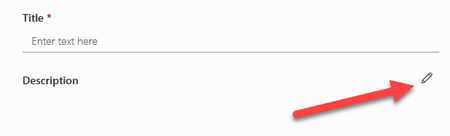
This is reproducible by creating a list with a Multiple Lines Text column using the Enhanced Rich Text setting. Create an item in that list, and the only way to edit that column (a.k.a. "field") is to click the edit button, which pops out a dialog box which has the old classic-looking toolbar/ribbon on it.
