Forum Discussion

Modern "News" Webpart - Filter options have disappeared
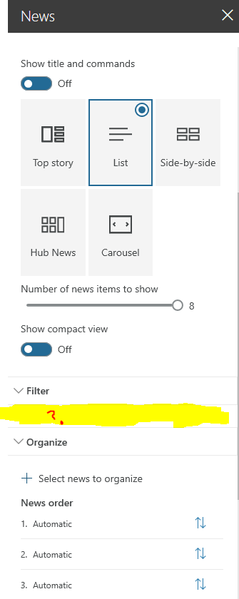
 Aug 12, 2019The filters are back, without any action from our side. It's unfortunately the 3 times in 5 months since our intranet is productive, that out-of-the-box functions are in trouble for several days without any official statement from Microsoft. Annoying! I would still rely on SP-OnPremise for highly critical services, since the transparence and the communication on the MS side concerning such bugs on SP-Online is for us not good enough.
Is there any way to be immediately informed for such trouble? The standard O365 Message Center didn't told anythings about those issues.
I observed with horror the same issue, no filter function anymore on our intranet. Maybe came the problem since we got the new audience feature. Unfortuntately, i don't have any third-party things to deactivate in order to get it quickly back. It's a huge problem since we manage the several type of news on the intranet startpage with those filters. Any clue to fix this?
- Raphael GuisolanAug 12, 2019Brass ContributorThe filters are back, without any action from our side. It's unfortunately the 3 times in 5 months since our intranet is productive, that out-of-the-box functions are in trouble for several days without any official statement from Microsoft. Annoying! I would still rely on SP-OnPremise for highly critical services, since the transparence and the communication on the MS side concerning such bugs on SP-Online is for us not good enough.
Is there any way to be immediately informed for such trouble? The standard O365 Message Center didn't told anythings about those issues.- SophieSueAug 13, 2019Brass Contributor
Raphael Guisolan - Thanks! It appears the settings are back on my end as well. I agree, communication regarding these issues is lacking. Users are spending needless hours of troubleshooting when these issues arise---time that would not have been wasted if Microsoft had simply acknowledged the problem and confirmed that they were working on a solution. Very frustrating.
 lisa whiteAug 22, 2019Brass Contributor
SophieSue Our filter options have not returned. Did anyone do anything special -- like bite the head off a chicken or sacrifice a geek? This will be really bad news to one of my user groups who specifically want this feature.
Ah, Microsoft Peek-a-Boo rides again.
 Rick DeFoeAug 08, 2019Iron ContributorWe have noticed the same thing in our Highlighted content webpart. When using the source option of "The page library on this site" we no longer have filter options, we only have the sort option. Funny thing is we have a bunch that were configured to filter by column setup and they work correctly but we are not able to edit these webparts because if we do the filter gets removed and we have no way of getting it back.
I have found a workaround. You can change the source to "This Site" and then the filters come back but you have to filter by "Managed Property" instead of column.- SophieSueAug 08, 2019Brass Contributor
Rick DeFoe Ours is behaving similarly. Parts that were setup before this issue began are still filtering correctly -- we just can't edit them or add new ones. Unfortunately, the source-switching workaround you mentioned doesn't seem to be working for us.
