Forum Discussion

Modern library item details/properties not accessible when embedded in page
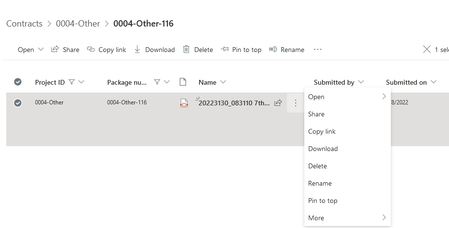

Gilmour10 that's how the document library web part is designed, there isn't a setting to switch on the Details link.
Rob
Los Gallardos
Intranet, SharePoint and Power Platform Manager (and classic 1967 Morris Traveller driver)
 Gilmour10Jul 01, 2022Tin Contributor
RobElliott , thank you for clarifying. I’d be curious to know why this limitation. Need to ask: what I’m trying to achieve is for the web part in the page to be read only, but with full reading access to details. Can you suggest a workaround?
Thank you again for responding
- RobElliottJul 01, 2022Silver Contributor
Gilmour10 I don't know why there is this difference, I don't work for Microsoft. But there is a solution to this using JSON view formatting.
In your document library create a view and select Format current view from the views dropdown. In advanced mode delete what's already there and paste in the following JSON code:
{
  "$schema": "https://developer.microsoft.com/json-schemas/sp/view-formatting.schema.json",
  "hideSelection": true,
  "hideColumnHeader": true,
  "rowFormatter": {
    "elmType": "div",
    "style": {
      "flex": "0 0 170px",
      "display": "inline"
    },
    "children": [
      {
        "elmType": "button",
        "customRowAction": {
          "action": "editProps"
        },
        "txtContent": "Edit Properties",
         "style": {
          "background-color": "#e3e7e7",
          "width": "135px",
          "height": "32px",
          "margin": "10px 0"
        }
      },
      {
        "elmType": "button",
        "style": {
          "border": "None",
          "color": "#0077ff",
          "background-color": "transparent",
          "cursor": "pointer"
        },
        "txtContent": "[$FileLeafRef]",
        "customRowAction": {
          "action": "defaultClick"
        }
      }
    ]
  }
}
Then add a document library web part to your page and point it to your new view. That will give you the link to the document and also a button that opens the properties pane for that document:
Edit: for some reason the button in the web part doesn't seem to be clickable though it is from the library. I'll investigate.
Rob
Los Gallardos
Intranet, SharePoint and Power Platform Manager (and classic 1967 Morris Traveller driver)- Gilmour10Jul 05, 2022Tin Contributor
RobElliott:, thank you for the hack (it's great!)... however... the resulting view looks like this...
Although other fields are included in the view, they are not visible. I suspect the code could be modified to solve the issue... Unfortunately, I am not familiar at all with JSON.
Thank you for showing me that what I am trying to do IS possible. If you have any other advice, I'll be happy to give it a try!