Forum Discussion

Modern Document library: Search box gone?
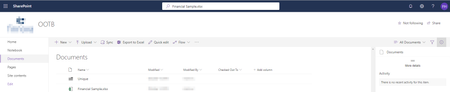
- DeletedMay 16, 2019
I opened a support case with Microsoft and the support agent was bewildered as well. We gathered Screenshots and Fiddler logs. To my surprise today everything has reverted back to normal but only for classic team sites. On modern team sites I can still see the new searchbox but in modern document libraries the old searchbox at the top left has returned. At least it's working.
And we determined that this is a preview feature at the moment and only users that, in the M365 admin center under organizational profile, ar enabled for "Targeted release for selected users" will see that feature. I was relieved to learn that as only a few select of our users have gotten confused by that hiccup.
So for the most part, all good now. Thanks for chiming in.

Deleted
We had the same thing happen earlier this week. The search box did not return results from our document library. I just went to check it again and now it has changed. The search box up top is now replaced with a SharePoint logo, which I don't recall being there, and the search box has returned to the normal position! On another SharePoint page the search box is still at the top, but that is not a document library. This drives me crazy when a feature appears and then disappears. Had this happen with sticky headers in our document library. One day it's there and the next it's gone.
- DeletedMay 16, 2019Not applicable
I opened a support case with Microsoft and the support agent was bewildered as well. We gathered Screenshots and Fiddler logs. To my surprise today everything has reverted back to normal but only for classic team sites. On modern team sites I can still see the new searchbox but in modern document libraries the old searchbox at the top left has returned. At least it's working.
And we determined that this is a preview feature at the moment and only users that, in the M365 admin center under organizational profile, ar enabled for "Targeted release for selected users" will see that feature. I was relieved to learn that as only a few select of our users have gotten confused by that hiccup.
So for the most part, all good now. Thanks for chiming in.
- Norman YoungMay 16, 2019MVP
We reverted back as well.
 Tatiana2019May 27, 2020Copper Contributor
Norman Young how?
- SergeiBaklanMay 16, 2019Diamond Contributor
Deleted , that Microsoft Search box appeared not only in the title bar of Sharepoint site, but in the title bar of all Office applications - not only online ones but for desktop versions as well (Word, Excel, etc). If you are on Monthly channel at least.
For the Sharepoint it's shown if only you are on pages other than document library or list. Here "local" search as before works with bar in top left corner.
That's what I see now and my understanding that how is going to be.
- DeletedMay 16, 2019Not applicable
Thanks and I can confirm that it appears where you said it would. So since the Microsoft support engineer was unable to point me to the correct roadmap-id and based on my interpretation it must be the one I linked in my initial post. Will keep an eye on it's development.

