Forum Discussion

MobileExcelWebAccess Feature -Site Template Error
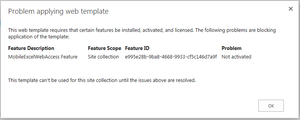

Joanne,
I am new to sharepoint office 365 online.
We are also facing same issue,How to run this script online Sahrepoint.
Can you help me.

@Chenreddy
If you're new to O365 Administration and Powershell, I can see how this might be difficult. Here's a step-by-step:
1. download and install SP Online Management Shell as Joann indicated (https://www.microsoft.com/en-us/download/confirmation.aspx?id=42038)
2. run the Management Shell -- a command window will open
3. copy the code in Joann's first post -- everything from the word "function" to the last curly brace.
4. paste that into the Management Shell window, hit enter. You'll get no response other than the normal prompt, but now the code is loaded and ready to use.
5. from Joann's second post, copy the line of code above #Modify url..." and paste it into the Shell window. Edit the line to chage the URL to your own SP site: "https://yoursite.sharepoint.com, then hit enter.
6. same with the code above "Modify Username..." -- change it to your login and hit enter.
7. same with the code above "Modify feature ID..." -- your error message from SharePoint prabably matches the long string, but if it doesn't, substitute yours and hit enter.
8. copy the line starting with "$sPassword," paste and hit enter -- enter your password at the prompt.
9. finally, copy and paste the "Enable-SPOFeature" code, hit enter. That will call the function using the information you entered. Go back to SP and try out your site template.
Best,
Jim
 Keith EsslemontFeb 20, 2017Copper ContributorThis just worked for me, so thanks for the info.
Keith AnonymousJan 12, 2017Worked wonderfully!! Thanks to you and Joanne for the post.
- NeilSargentNov 24, 2016Copper Contributor
Wow, thank you. I know nothing of SharePoint administration "under the hood", have never used PowerShell but this has fixed the problem for me. Thank you for the step-by-step instructions.
 Joanne LaRoseAug 03, 2016Brass ContributorJust something I had overlooked when running this script is on #2 make sure you run "As Administrator"