Forum Discussion

MobileExcelWebAccess Feature -Site Template Error
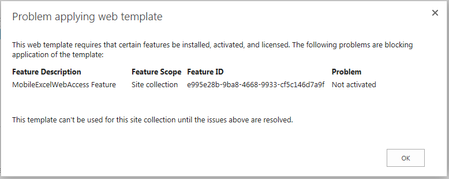

I just got off the phone with Microsoft regarding this issue. They provided me with a script that i will post below. Prior to running the script run Powershell online Management Shell as Administrator, download and install SharePoint Online Client Components SDK:
https://www.microsoft.com/en-us/download/confirmation.aspx?id=42038
Copy the Feature ID from the error message
Then copy paste the following script (Modified with your info as noted):
$host.Runspace.ThreadOptions = "ReuseThread"
#Definition of the function that allows to enable a SPO Feature
function Enable-SPOFeature
{
param ($sSiteColUrl,$sUserName,$sPassword,$sFeatureGuid)
try
{
#Adding the Client OM Assemblies
Add-Type -Path "C:\Program Files\Common Files\Microsoft Shared\Web Server Extensions\16\ISAPI\Microsoft.SharePoint.Client.dll"
Add-Type -Path "C:\Program Files\Common Files\Microsoft Shared\Web Server Extensions\16\ISAPI\Microsoft.SharePoint.Client.Runtime.dll"
#SPO Client Object Model Context
$spoCtx = New-Object Microsoft.SharePoint.Client.ClientContext($sSiteColUrl)
$spoCredentials = New-Object Microsoft.SharePoint.Client.SharePointOnlineCredentials($sUsername, $sPassword)
$spoCtx.Credentials = $spoCredentials
Write-Host "----------------------------------------------------------------------------" -foregroundcolor Green
Write-Host "Enabling the Feature with GUID $sFeatureGuid !!" -ForegroundColor Green
Write-Host "----------------------------------------------------------------------------" -foregroundcolor Green
$guiFeatureGuid = [System.Guid] $sFeatureGuid
$spoSite=$spoCtx.site
$spoSite.Features.Add($sFeatureGuid, $true, [Microsoft.SharePoint.Client.FeatureDefinitionScope]::None)
$spoCtx.ExecuteQuery()
$spoCtx.Dispose()
}
catch [System.Exception]
{
write-host -f red $_.Exception.ToString()
}
}

Hello Joanne,
Just to update this article. Yes, it did resolved the issue. Thank you so much for sharing your knowledge regarding on this one.
Regards,
Edelle