Forum Discussion

MobileExcelWebAccess Feature -Site Template Error
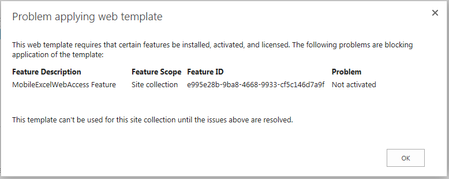

I just got off the phone with Microsoft regarding this issue. They provided me with a script that i will post below. Prior to running the script run Powershell online Management Shell as Administrator, download and install SharePoint Online Client Components SDK:
https://www.microsoft.com/en-us/download/confirmation.aspx?id=42038
Copy the Feature ID from the error message
Then copy paste the script in the following reply (due to 20k char limit)(Modify with your info as noted)
- Joanne LaRoseJul 21, 2016Brass Contributor
I just got off the phone with Microsoft regarding this issue. They provided me with a script that i will post below. Prior to running the script run Powershell online Management Shell as Administrator, download and install SharePoint Online Client Components SDK:
https://www.microsoft.com/en-us/download/confirmation.aspx?id=42038
Copy the Feature ID from the error message
Then copy paste the following script (Modified with your info as noted):
$host.Runspace.ThreadOptions = "ReuseThread"
#Definition of the function that allows to enable a SPO Feature
function Enable-SPOFeature
{
param ($sSiteColUrl,$sUserName,$sPassword,$sFeatureGuid)
try
{
#Adding the Client OM Assemblies
Add-Type -Path "C:\Program Files\Common Files\Microsoft Shared\Web Server Extensions\16\ISAPI\Microsoft.SharePoint.Client.dll"
Add-Type -Path "C:\Program Files\Common Files\Microsoft Shared\Web Server Extensions\16\ISAPI\Microsoft.SharePoint.Client.Runtime.dll"
#SPO Client Object Model Context
$spoCtx = New-Object Microsoft.SharePoint.Client.ClientContext($sSiteColUrl)
$spoCredentials = New-Object Microsoft.SharePoint.Client.SharePointOnlineCredentials($sUsername, $sPassword)
$spoCtx.Credentials = $spoCredentials
Write-Host "----------------------------------------------------------------------------" -foregroundcolor Green
Write-Host "Enabling the Feature with GUID $sFeatureGuid !!" -ForegroundColor Green
Write-Host "----------------------------------------------------------------------------" -foregroundcolor Green
$guiFeatureGuid = [System.Guid] $sFeatureGuid
$spoSite=$spoCtx.site
$spoSite.Features.Add($sFeatureGuid, $true, [Microsoft.SharePoint.Client.FeatureDefinitionScope]::None)
$spoCtx.ExecuteQuery()
$spoCtx.Dispose()
}
catch [System.Exception]
{
write-host -f red $_.Exception.ToString()
}
}
 Edelle TeeNov 16, 2018Copper Contributor
Hello Joanne,
Just to update this article. Yes, it did resolved the issue. Thank you so much for sharing your knowledge regarding on this one.
Regards,
Edelle- Ganesh MajetiJul 20, 2018Copper ContributorNo need of anymore dll adding as type and creating new objects... thanks to sharepoint new pnp module for online :)
Connect-PnPOnline "https://<tenant>.sharepoint.com/sites/<SiteCollectionName>"
$ctx = Get-PnPContext
$spoSite.Features.Add(<Feature-GUID>,$true)
$ctx.ExecuteQuery()  Jim ShillidayAug 03, 2016Tin Contributor
@Joann -- Thank you so much for this fix and expecially for the perfect instructions! Worked on the first try.