Forum Discussion

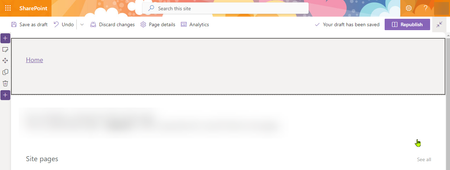
Missing Title Area - how to recover or show
- Feb 21, 2023
Tamras1972 I am guessing you did something like this: SharePoint Online: Create a blank page without header & title
To bring back the header and title area on site page, you can use PnP PowerShell like:
Connect-PnPOnline -Url https://tenant.sharepoint.com/sites/siteName -UseWebLogin
Set-PnPPage -Identity "MyPage" -LayoutType "Article"
Please click Mark as Best Response & Like if my post helped you to solve your issue. This will help others to find the correct solution easily. It also closes the item. If the post was useful in other ways, please consider giving it Like.
For SharePoint/Power Platform blogs, visit: Ganesh Sanap Blogs

Tamras1972 I am guessing you did something like this: SharePoint Online: Create a blank page without header & title
To bring back the header and title area on site page, you can use PnP PowerShell like:
Connect-PnPOnline -Url https://tenant.sharepoint.com/sites/siteName -UseWebLogin
Set-PnPPage -Identity "MyPage" -LayoutType "Article"
Please click Mark as Best Response & Like if my post helped you to solve your issue. This will help others to find the correct solution easily. It also closes the item. If the post was useful in other ways, please consider giving it Like.
For SharePoint/Power Platform blogs, visit: Ganesh Sanap Blogs
 Tamras1972Feb 22, 2023Iron ContributorThank you so much!