Forum Discussion

simuuh
Nov 05, 2020Brass Contributor
Missing "custom sort" function in the new Term store
Is this function not available or can I not see it? Currently we use this function to control the position of the entries in the navigation.
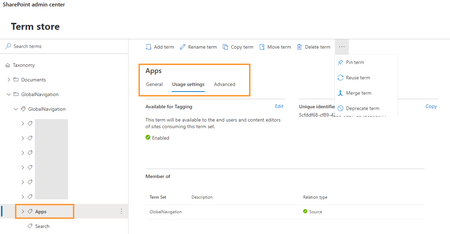

DaveMehr365
Apr 04, 2023MVP
Hello nuchuck
YES 💪
In modern term store:
you can activate a custom sort order:
It's not a pinned or reusable term group.
Best, Dave

Clay_Osborn
Apr 05, 2023Copper Contributor
DaveMehr365 This is only available at the top level as you have shown here. Go another level deeper and the option is not there. We need to be able to sort all terms within all parent terms, not just the highest level alone.
 NKG_MatzeJul 13, 2023Copper ContributorThe topic is still current.
Has anyone already found a solution? We have opened a ticket with Microsoft.
The answer so far was that almost no one needs this function. Unfortunately, there are too few objections regarding the omission of the function.
This is again Microsoft who partly completely headless simply remove functions and are of the opinion that this no one needs. Since one can only shake the head. We can no longer sort our submenus, that is suboptimal.
Micrsoft should please extend the function again to all levels.
In the old term store it worked tatdelos.
Incomprehensible 🙈 PaulLAug 20, 2023Brass ContributorI have found that as of today this has been fixed. Second level items can be sorted from the usage Settings tab in the same way that first level items can be sorted.
- Jace_CAug 01, 2023Brass ContributorThis really sucks. I am in the same boat. Microsoft has sunset the classic term store for my tenant, so now I am completely unable to custom sort. Funny enough, the custom sorting I did perform prior to losing the classic term store is still in effect. So now, I have no way of adjusting the custom sorting for the terms with a custom sort. Good times....
 Andreas_HaenniAug 10, 2023Copper Contributor
Jace_C
I found a solution. Navigate on a site collection in SharePoint to site settings, than select term store. On the right top corner you can now switch to "RETURN TO CLASSIC" mode.
