Forum Discussion

Microsoft Flow - Copy files from PC to SharePoint - Error
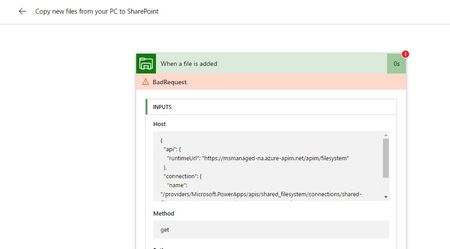
- Jun 02, 2017
We were using this process sucefully for a number of months however it appears FLOW might no longer support this process.
https://powerusers.microsoft.com/t5/Building-Flows/file-system-copy-file-to-SharePoint/m-p/37797#M3447

We were using this process sucefully for a number of months however it appears FLOW might no longer support this process.
https://powerusers.microsoft.com/t5/Building-Flows/file-system-copy-file-to-SharePoint/m-p/37797#M3447

Thanks for the response Andrew. Had been wondering where I was going wrong.
I think your question is not answered in that same thread which you had shared. The reply was suggestiong to OneDrive to Sync one drop-off library kind of setup and then trigger a workflow in that library which will push to your actual destination library. It may work in yours but not in my requirement atleast.
What I was looking for is an unattended set-up for synchronizing files automatically without any manual intervention and this seemed to be an optimum solution. Now I may have to go to old-school, which is custom-.scripting.
Thanks anyways for the update.
Arjun.
- Andrew ReynoldsJun 06, 2017Iron Contributor
Hi Arjun Menon
I agree didnt really get an answer that helped.
If Microsoft have removed this functionality it would be interesting to understand why.
- Jun 05, 2017
Stephen Siciliano can you help here?
- Andrew ReynoldsJul 16, 2017Iron Contributor
Stephen Siciliano Arjun Menon I just wanted to see if there has been any update to this issue. When it worked was very useful.
I see the current file system triggers just list metadata only items - has the functionality been removed
MichaelHolsteperhaps you could help find the people who can help here?
Thanks
 Stephen SicilianoJul 16, 2017Former Employee
I want to apologize for the confusion here. We had an update to the File System connector that has the trigger only return back the metadata of Files. This change was made because some files are too big and the trigger was failing (the On-premises Data Gateway has a relatively low limit for file size).
However, you CAN still accomplish your scenario, it just takes one extra step. Now you can do:
- When a file is created or updated
- Get file content (or, Get file content by path)
- Whatever actions you wanted...With this pattern you can use an error-handling step to also handle the case where the file is too big, so you can choose what to do (e.g. send yourself a notification, or you could ignore it). That would be impossible with the previous pattern.
Again, sorry for the issue, please let me know if this pattern doesn't work.
