Forum Discussion

jamescosten
Oct 21, 2022Brass Contributor
Measure Reverse Date
I have a calculated column that will not allow me to change to date so i created a measure. This works but the date format is backwards. Is there an additional piece of code i can put to reverse t...

jamescosten
Oct 24, 2022Brass Contributor
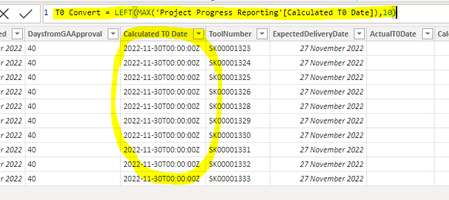
The Calculated column is date only format, yet when imported to BI includes the data in the image. It wont let me change it in BI and there are no additional settings in the list.

SvenSieverding
Oct 24, 2022Bronze Contributor
Calculated columns in SharePoint are not real "date" columns (even if you set the type to date), but more or less just a fancy string.
So it gets exported as a string containing a datetime timestamp.
In Power BI you need to transform the column type to date first and then transform the column to just show the date part of the datetime...
Something like this
#"LastTableRow"=....
#"Changed Type"=Table.TransformColumnTypes(#"LastTableRow",{{"Calculated TO Date", type date}})
#"Converted Date"=Table.TransformColumns(#"Changed Type",{{"Calculated TO Date", DateTime.Date, type date}})