Forum Discussion

Make a page looking more professional


Hi Rob RobElliott
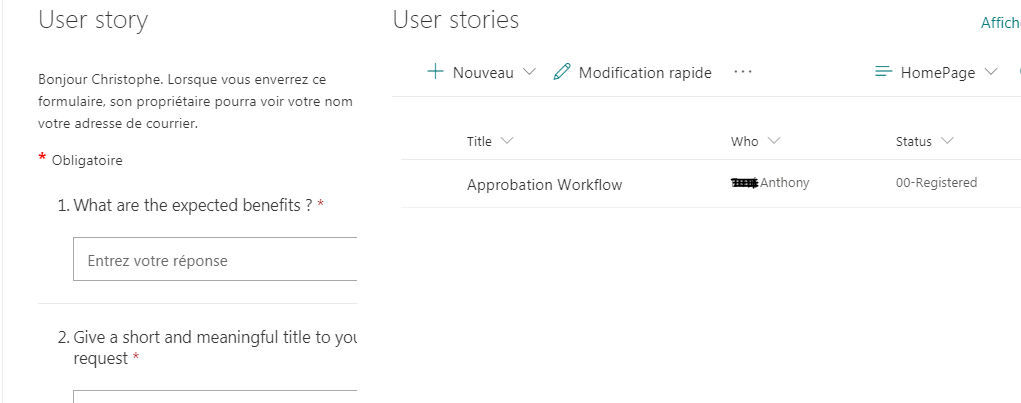
thank you so much for your answer, I can't wait seeing your mockup. about the rendering issue, do you know why the fields are truncated and how I could fix it ? thanks again !! 

CSA75FR sorry, what's being truncated?
Rob
Los Gallardos
Microsoft Power Automate Community Super User
- CSA75FRJul 09, 2020Copper Contributor
RobElliott please kindly take a look on the attachment, you will notice the fields of the form are not displayed entirely, right side is truncated..
- RobElliottJul 09, 2020Silver Contributor
CSA75FR I'm not sure why your form is getting truncated as in my experience it is responsive and even at a section style of one-third left it displays without any problem.
But for the formatting on the page, the SharePoint list columns are :
Title: single line of textEmail: single line of text
Who: single line of text
Status: Choice (Registered, Approved, Rejected)
Description: multiple lines of text
Benefits: multiple lines of text
A flow in Power Automate grabs the response and creates an item in the SharePoint list:
I have created a new view for the list called JSON and the syntax is shown below. This needs to go into the Format Current View:
{
  "$schema": "https://developer.microsoft.com/json-schemas/sp/view-formatting.schema.json",
  "hideSelection": true,
  "hideColumnHeader": true,
  "rowFormatter": {
    "elmType": "div",
    "_comment_": "MAIN DIV",
    "attributes": {
      "class": "ms-bgColor-themeLight"
    },
    "style": {
      "display": "flex",
      "flex-wrap": "wrap",
      "align-items": "stretch",
      "flex-direction": "row",
      "padding": "20px",
      "margin-bottom": "16px",
      "max-width": "930px",
      "border-radius": "8px",
      "background-color": "#f1dede0"
    },
    "children": [
      {
        "elmType": "div",
        "style": {
          "flex-grow": "1",
          "display": "flex",
          "flex-direction": "column",
          "flex-wrap": "nowrap",
          "align-items": "left",
          "max-width": "360px",
          "min-width": "205px"
        },
        "children": [
          {
            "elmType": "div",
            "style": {
              "display": "block",
              "font-size": "15px",
              "font-weight": "normal"
            },
            "children": [
              {
                "elmType": "span",
                "txtContent": "=[$Title]",
                "style": {
                  "display": "=if([$Title] == '', 'none', 'block')"
                },
                "attributes": {
                  "class": "ms-fontSize-l ms-fontWeight-semibold ms-fontColor-neutralPrimary"
                }
              },
              {
                "elmType": "span",
                "txtContent": "[$Email]",
                "style": {
                  "display": "=if([$Email] == '', 'none', 'block')"
                }
              },
              {
                "elmType": "span",
                "txtContent": "='Status: ' + [$Status]",
                "style": {
                  "display": "=if([$Status] == '', 'none', 'block')",
                  "padding-top": "20px",
                  "margin-bottom": "20px"
                }
              }
            ]
          }
        ]
      },
      {
        "elmType": "div",
        "_comment_": "DIV TWO",
        "style": {
          "flex-grow": "1",
          "display": "flex",
          "flex-direction": "column",
          "flex-wrap": "nowrap",
          "align-items": "stretch",
          "max-width": "260px"
        }
      },
      {
        "elmType": "div",
        "_comment_": "DIV THREE",
        "style": {
          "flex-grow": "1",
          "display": "flex",
          "flex-direction": "column",
          "align-items": "left",
          "max-width": "310px",
          "min-width": "155px"
        },
        "children": [
          {
            "elmType": "div",
            "style": {
              "display": "block",
              "font-size": "15px",
              "font-weight": "normal"
            },
            "children": [
              {
                "elmType": "span",
                "txtContent": "='Description: ' + [$Description]",
                "style": {
                  "padding-right": "5px"
                }
              },
              {
                "elmType": "span",
                "txtContent": "='Potential Benefits: ' + [$Benefits]",
                "style": {
                  "padding-right": "5px"
                }
              }
            ]
          },
          {
            "elmType": "div",
            "style": {
              "display": "block",
              "font-size": "15px",
              "font-weight": "normal"
            }
          }
        ]
      }
    ]
  }
}
You must make sure that there isn't a [$column] reference to a column that doesn't exist or the formatting will just return a blank.
The result looks like this as shown below, which I hope you will think looks a lot better than the ugly default SharePoint list!
Come back with any questions about this or if you need any further help.
Rob
Los Gallardos
Microsoft Power Automate Community Super User