Forum Discussion

ca_rem
Jan 03, 2020Brass Contributor
Make a FIeld not required
I have a Sharepoint List name "Delivery Orders" But I have add 3 content type to this List. 3 Content Type have the Item Content Type is the Parent Content type so that have Title Column. I have s...

ca_rem
Jan 04, 2020Brass Contributor
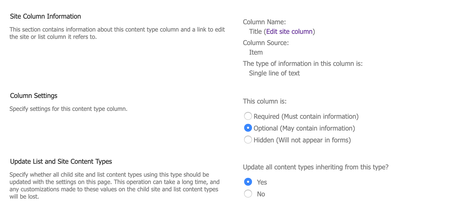
ChrisWebbTech. I click on the Column Field but no setting to make it not required.
Can you give me another advise?

Jan 04, 2020
I don’t know if it matters or not. It you can’t have blank values and unique checked too
- ca_remJan 04, 2020Brass Contributor
ChrisWebbTech No, I can't have blank value, It required. Please see the image above
- Jan 04, 2020You have unique values checked. You can’t have blank values if this is Checked. Which means you have to put In a value. Aka required. I don’t think this is the issue but you won’t be able to not enter a value of unique is set because once someone enters one blank. The next blank is.l no longer unique.
- Jan 04, 2020Also what type of list did you create this from? Required should be an option from a custom list template. If you create a new list is the option there on the title column?