Forum Discussion

MonikaK
Jan 20, 2020Copper Contributor
List in SharePoint is changing field by itself to blank
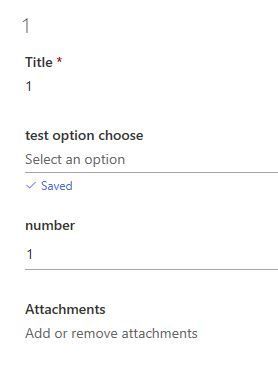
I have a simple list in SharePoint with few different types of columns. When I double click on the item, it opens on the right with more information about it. When I click on a value in the "Title" ...
 DeletedJan 20, 2020
Hi MonikaK - we had an incident today where choice columns formatted as radio buttons included a blank choice. We opened a Microsoft support ticket and they have since resolved it. Microsoft posted this to our Office 365 Message Center:
Additional blank Choice option on SharePoint Online listsSP201752, SharePoint Online,Last updated: January 20, 2020 12:39 PMStart time: January 17, 2020 3:00 PM,End time: January 20, 2020 12:11 PMStatus: Service restoredUser impact: Users were seeing an additional blank field when selecting a Choices option within SharePoint Online lists.Latest messageTitle: Additional blank Choice option on SharePoint Online listsUser Impact: Users were seeing an additional blank field when selecting a Choices option within SharePoint Online lists.More info: The additional blank field was seen within the drop-down menu when selecting a Choices option.Final status: We determined that a previously implemented fix intended to remediate a code issue was reverted, resulting in service impact. We've reapplied the fix throughout the affected environment and received confirmation from affected users that impact has been remediated.Scope of impact: Your organization was affected by this event. This issue may have potentially affected any of your users attempting to select a Choice option from the drop-down menu on SharePoint Online lists.Start time: Friday, January 17, 2020, 3:00 PM (8:00 PM UTC)End time: Monday, January 20, 2020, 12:11 PM (5:11 PM UTC)
Deleted
Jan 20, 2020Hi MonikaK - we had an incident today where choice columns formatted as radio buttons included a blank choice. We opened a Microsoft support ticket and they have since resolved it. Microsoft posted this to our Office 365 Message Center:
Additional blank Choice option on SharePoint Online lists
SP201752, SharePoint Online,
Last updated: January 20, 2020 12:39 PM
Start time: January 17, 2020 3:00 PM,
End time: January 20, 2020 12:11 PM
Status: Service restored
User impact: Users were seeing an additional blank field when selecting a Choices option within SharePoint Online lists.
Latest message
Title: Additional blank Choice option on SharePoint Online lists
User Impact: Users were seeing an additional blank field when selecting a Choices option within SharePoint Online lists.
More info: The additional blank field was seen within the drop-down menu when selecting a Choices option.
Final status: We determined that a previously implemented fix intended to remediate a code issue was reverted, resulting in service impact. We've reapplied the fix throughout the affected environment and received confirmation from affected users that impact has been remediated.
Scope of impact: Your organization was affected by this event. This issue may have potentially affected any of your users attempting to select a Choice option from the drop-down menu on SharePoint Online lists.
Start time: Friday, January 17, 2020, 3:00 PM (8:00 PM UTC)
End time: Monday, January 20, 2020, 12:11 PM (5:11 PM UTC)
 MonikaKJan 21, 2020Copper Contributor
Thank you Deleted
I have checked it and it works now for me.
- simuuhJan 20, 2020Brass Contributor
Deleted MonikaK
marcusbancroft reported the same error here. In my Message center is no information about this bug. and the bug still existits
