Forum Discussion

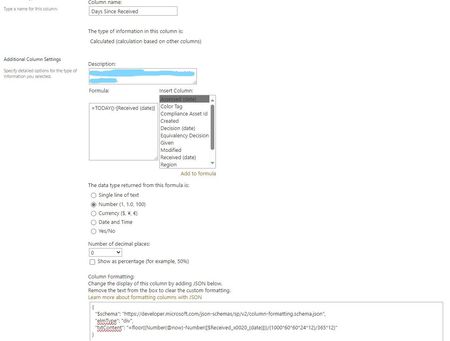
JSON Code not working when calculating Days Since Received
- Oct 20, 2024
LearningSharepoint what are the dates in your ReceivedDate column? Also, make sure you don't just re-name the column but create a new one as renaming it doesn't change the original internal column name.
Rob
Los Gallardos
Microsoft Power Automate Community Super User.
Principal Consultant, SharePoint and Power Platform WSP Global (and classic 1967 Morris Traveller driver)

Thank you both for your comments. I've made the change to the column name to avoid special characters and also changed the end of the coding to "86400000" versus what I had. I'm farther along than I was before and actually have a number displayed now, however, I'm getting a seemingly random number in the "Days Since Received" column with every response now showing "20016". I'm not sure how this number comes to be, as the dates of my now "ReceivedDate" column are different.
I also created a new test column with the JSON, just to see, and it also displays the same.
For clarity, my JSON is as follows now:
{
  "$schema": "https://developer.microsoft.com/json-schemas/sp/v2/column-formatting.schema.json",
  "elmType": "div",
  "txtContent": "=floor((Number(@now)-Number([$ReceivedDate]))/86400000"
}
Any ideas on this one?

LearningSharepoint what are the dates in your ReceivedDate column? Also, make sure you don't just re-name the column but create a new one as renaming it doesn't change the original internal column name.
Rob
Los Gallardos
Microsoft Power Automate Community Super User.
Principal Consultant, SharePoint and Power Platform WSP Global (and classic 1967 Morris Traveller driver)
- LearningSharepointOct 23, 2024Copper ContributorI re-named the column, so thank you for mentioning that. I've created a new one, fixed the JSON, and it's now functioning!
Much appreciated.