Forum Discussion

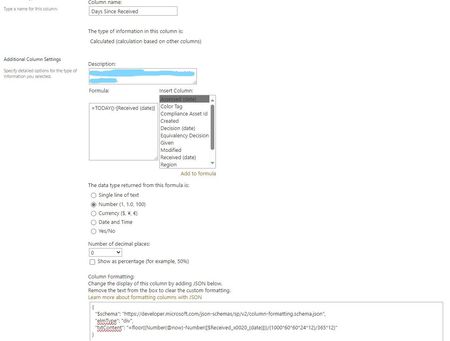
JSON Code not working when calculating Days Since Received
- Oct 20, 2024
LearningSharepoint what are the dates in your ReceivedDate column? Also, make sure you don't just re-name the column but create a new one as renaming it doesn't change the original internal column name.
Rob
Los Gallardos
Microsoft Power Automate Community Super User.
Principal Consultant, SharePoint and Power Platform WSP Global (and classic 1967 Morris Traveller driver)

LearningSharepoint a calculated column will always return a static value so for it to be dynamic you must use JSON; there s no other method. A couple of comments on what you've done so far:
- your column appears to be called Received (date). The parenthesis are special characters which need to be converted in the same way that a space is converted to _x0020_ . I have to say that in my column names I always try to avoid special characters as far as possible as they invariably cause problems. So my preferred column name would be Received or ReceivedDate.
- Your JSON doesn't have these converted characters, you have just used the parenthesis which is incorrect.
- Look at the internal name of the column to get the correct name to use in your JSON. Go to list settings, click on the field and in the url bar the internal name is after the Field=. In my case the internal name of Received (date) is Received_x0028_date_x0029_
The following JSON will then work to dynamically calculate the number of days between Received (date) and now:
{
  "$schema": "https://developer.microsoft.com/json-schemas/sp/v2/column-formatting.schema.json",
  "elmType": "div",
  "txtContent": "=floor((Number(@now)-Number([$Received_x0028_date_x0029_]))/86400000)"
}
Rob
Los Gallardos
Microsoft Power Automate Community Super User.
Principal Consultant, SharePoint and Power Platform WSP Global (and classic 1967 Morris Traveller driver)

Thank you both for your comments. I've made the change to the column name to avoid special characters and also changed the end of the coding to "86400000" versus what I had. I'm farther along than I was before and actually have a number displayed now, however, I'm getting a seemingly random number in the "Days Since Received" column with every response now showing "20016". I'm not sure how this number comes to be, as the dates of my now "ReceivedDate" column are different.
I also created a new test column with the JSON, just to see, and it also displays the same.
For clarity, my JSON is as follows now:
{
  "$schema": "https://developer.microsoft.com/json-schemas/sp/v2/column-formatting.schema.json",
  "elmType": "div",
  "txtContent": "=floor((Number(@now)-Number([$ReceivedDate]))/86400000"
}
Any ideas on this one?
- Rob_ElliottOct 20, 2024Silver Contributor
LearningSharepoint what are the dates in your ReceivedDate column? Also, make sure you don't just re-name the column but create a new one as renaming it doesn't change the original internal column name.
Rob
Los Gallardos
Microsoft Power Automate Community Super User.
Principal Consultant, SharePoint and Power Platform WSP Global (and classic 1967 Morris Traveller driver)- LearningSharepointOct 23, 2024Copper ContributorI re-named the column, so thank you for mentioning that. I've created a new one, fixed the JSON, and it's now functioning!
Much appreciated.