Forum Discussion

Now – move files anywhere in Office 365, SharePoint and OneDrive
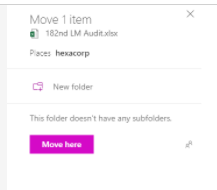

Have you tried "Copy" instead? I've noticed with larger files that the ability to move outside the site, including to OneDrive, isn't available, but I've not seen this with Copy. I don't know what that size threshold is, and I don't see the size of your file, so that may/may not be your issue.
Future reference, the SharePoint community is going to be the best place to get an answer for questions like this.
 Saicharan JanakiramanJan 25, 2018Copper Contributor
HI matt
Appreciate your response!
Is it possible to use "copy" to move files with the versioning?- Matt CoatsJan 25, 2018Iron Contributor
Well that's a bummer--copy only takes the most recent version. Furthermore, I checked a few of my documents with versioning and found that all of them couldn't use the "Move" function, either, so that's telling.
If you're feeling bold, you could give this method a try; I would highly recommend testing this on a dummy file first, since there isn't any going back once you've moved a file in this way in case it doesn't work.
- EricStarkerJan 25, 2018Former Employee
I'm moving this conversation to the SharePoint community. Thanks.
