Forum Discussion

If Statements For Calculated Column Beyond 19 Nested Cap
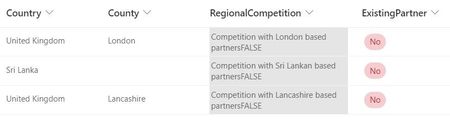

NM1979 wrote:Hi,
I hope this is the right place I can post this query.I'm currently trying to create a calculated column based off three other columns:
1) Country (Selectable from drop down)
2) County (Drop Down) (For use if 'UK' is selected)
3) Existing Partnership (Yes/No)
I want the calculated field to flag if we have existing partnerships within a country or UK region that might be a conflict of interest. For this I've done:
An example for within the UK:
=IF(AND(Country="United Kingdom",County="London",ExistingPartner="No"),"Competition with London based partners" - For each of the counties we have existing operations in.
Example for internationally:=IF(AND(Country="United States",ExistingPartner="No"),"Competition with American based partners" - For each of the countries we have existing operations.
It works fine up https://themovingman.co.uk/packing-service-london/ the 19 nested IF statement cap, and the calculated column shows the appropriate competition message correctly. However, I need more than the 19. When I use the & operator and continue adding IF statements in the same way as above, it will now add a 'FALSE' in the RegionalCompetition column because its looking at the next set of IF statements.
I appreciate, I might be doing this the incredibly long winded way, and there's a much simpler solution to what I'm trying to achieve, but my main question is, how can I get this to look at all the IF statements without it returning a 'FALSE' for the next batch?
Or is there a simpler way I can write an IF statement such as If Country="X","Y","Z",ExistingPartner="No"?
Or am I better Power Automating this process instead?
Thanks!
on which system you are facing this problem?