Forum Discussion

Paul Bullock
Jun 18, 2019Brass Contributor
Hub Sites and Visual Issues
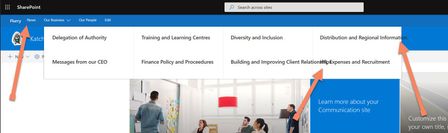
I'm having Styling issues in Target Release and Standard Release tenants at the moment, for Hub sites and MegaNav, this is a OOB site, not hacks or SPFX App Customisers. The visual issues include: ...

Susan_Hanley
Jun 18, 2019MVP
Paul Bullock I have struggled with the same issue. For now, I would recommend:
- Only use the megamenu if you have 3 levels in your menu. If you only need 2 levels, as you are showing, you can achieve what you want by using the simpler Cascading menu. You are not required to use a megamenu - if you only have two levels of links, it is not the best option.
- I know this is silly, but use shorter heading labels. Use Headers for Level 2 (not URLs). You will get slightly more real-estate for labels in Level 3, where you can put your URLs if you are using the megamenu.
- To make it easier for users to understand what is a Header and what is a URL, use ALL CAPS for your Header links at Level 2.
 Paul BullockJun 18, 2019Brass Contributor
Hi Susan_Hanley
Thank you for your response, the screenshot is a mock from a client who didn't want to share their portal. There is a level 3 - I didn't include that in my own tenant in the screenshot (because I forgot to include them 🤦♂️). I could make the titles shorter, had considered it, but the sites I am building are bi-lingual and the translated words are much longer than English 😒
I will try you other suggestions.
Thanks
Paul