Forum Discussion

Hub site search is not searching all associated sites
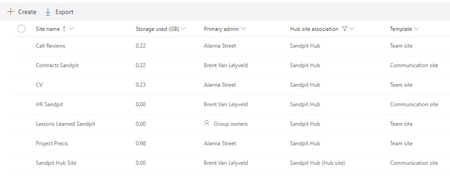

1. Are you an explicit member on these sites? You must be for search index to search the content and return to the hub search. If these are office 365 group connected site then you need to be listed as a member in addition to owner if you are in fact owners on the sites, this used to be a bug and still might be.
2. Give it time, at least 15 minutes to Index.
 bvanlelyveldMar 16, 2019Copper Contributor
ChrisWebbTech Thanks for the suggestion. I am an explicit member on some associated sites and an owner of others. I have now also made myself a member of these sites and waited 15 minutes to index, however the search result from the hub site is still not including associated sites. The strange thing is if I use the SharePoint app on my phone the search results from the hub site works fine, with the results being displayed for all associated sites.
 Greg VerbarendseApr 16, 2019Copper Contributor
bvanlelyveld , did you ever get this resolved? I just started testing a hub site today and am finding the exact same results that you posted. Using search on the hub site doesn't surface content from associated sites in a web browser (tried both Chrome and Edge) but does surface content from associated sites when searching from the SharePoint app in iOS. News posts are rolling up to the hub site though.
Thanks, Greg
 garyhenderson18May 28, 2019Copper Contributor
Greg Verbarendse I am seeing the exact same thing. Am just experimenting with Hub sites so created two basic communication sites, made one the hub and associated the other with it.
Have added a menu item to the hub site and this successfully appears on the associated site however having added a file to the associated site, I do not appear to be able to search for it and find it from the hub site. In addition when on the hub site searching for the associated site, it doesn't appear. I am the owner of both sites plus am also an explicit member of both sites.
Any ideas on how to solve?