Forum Discussion

JPJPJP
Oct 18, 2019Brass Contributor
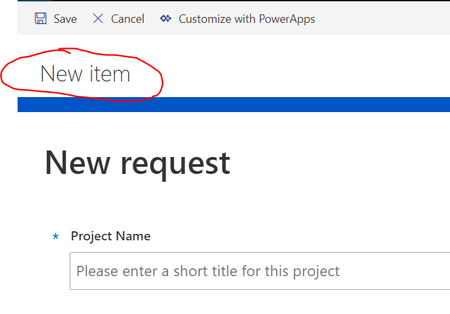
How to hide "New item" title on SharePoint List Form?
Hi there, I have a SharePoint List with a PowerApps customized list form, however when viewing the app on SharePoint full screen (via NewForm.aspx), it shows this annoying 'New item' title, that I c...

Aniruddhokodali
Jul 13, 2022Copper Contributor
Welcome 🙂. Happy to hear this solution help you out. Thank you.
Please click Mark as Best Response & Like if my post helped you to solve your issue. This will help others to find the correct solution easily. It also closes the item. If the post was useful in other ways, please consider giving it Like.

SPrice1510
Jul 15, 2022Copper Contributor
So i found where you do this if you're using a default form. I created a customized form with powerapps and this option is no longer available. Also, i am embedding this form on a page and even when using the default form, the New Item still appears once it is embedded. Is there a way to remove the New Item header after it is embedded? Maybe a snipit of code that goes into iframe?
- AniruddhokodaliJul 15, 2022Copper ContributorCan you please provide some screenshots.?
- SPrice1510Jul 15, 2022Copper Contributor
Attached is a screenshot of a simple form (customized form) that is embedded on a sp page. I cannot figure out how to get New item to go away. Even using the default form, your json removed the new item but once it is embedded into a page, the New item header is still present. Thanks in advance.
- AniruddhokodaliJul 15, 2022Copper ContributorOne quick question did you change the page URL in your application customizer with the current sp page where you embedded the powerapps form?
please change in serve.json page url with current sp page url where you embedded the powerapps form
"pageUrl": "page url ",