Forum Discussion

Nima-DE
Mar 24, 2022Tin Contributor
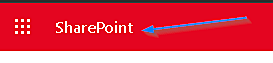
How to delete "Sharepoint" from Share Pint Online top bar
Does anyone know how to delete or hide this? Or maybe hide the whole top bar. thank you
- Mar 25, 2022
Hello Nima-DE
it's not support to: https://docs.microsoft.com/en-us/sharepoint/dev/solution-guidance/portal-branding
What not to do
The following list contains the key things not to do when you apply branding to your portal.
Don't:
- Override branding of the Office 365 Suite Bar.
- Customize branding for personal sites.
- Implement by default your custom branding by using custom master pages.
But if you do want to do it, maybe this will help:
My througts about the SharePoint start site:
Work with this site, it's a good overview for your users, and this are the informations, that will be appear in your SharePoint App Bar, so, let the link and train-train-train your user's.
Regards, Dave


shawn_fielding
Mar 24, 2022Iron Contributor
If you are using the modern experience you can't. But if you are using classic, you may be able to add some css in to hide it. Not sure, but theoretically possible.