Forum Discussion

How to cusotmize the grouped list title backgound color
 Apr 14, 2022
I tested the ability to find substrings inside the column value for columns used to group your list/library, and function indexOf(targetstring, searchsubstring) also works:
{
  "$schema": "https://developer.microsoft.com/json-schemas/sp/v2/row-formatting.schema.json",
  "groupProps": {
     "headerFormatter": {
        "elmType": "div",
        "txtContent": "= @group.columnDisplayName +': ' + @group.fieldData.displayValue",
        "style": {
        "background-color": "=if(indexOf(@group.fieldData, 'abc') >= 0, '#ffe0e0', if(indexOf(@group.fieldData, 'cde') >= 0, '#ffffe0', ''))",
        "font-weight": "bold"
      }
    }
  }
}
So the string containing 'abc' for the group header will be light red in background and that of 'cde' will be light green in background.

Steve_Penner, thanks for reply.
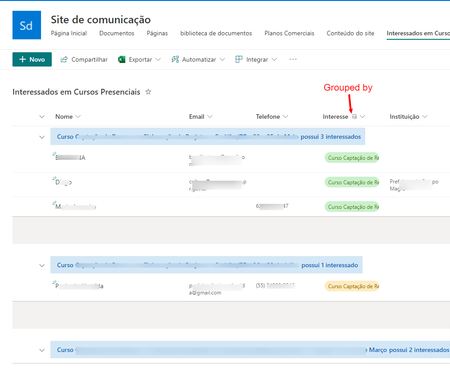
I had already done what you suggested. I applied a background color to the title, as it appears in this image.
However, what I need is to apply alternating colors depending on a part of the title string. For example, if the title contains "Curitiba" the background color must be green, if the title contains "Porto Alegre" the background color must be blue.
I tried this, but it don't works for me 
Thanks a lot for your attention.
I tested the ability to find substrings inside the column value for columns used to group your list/library, and function indexOf(targetstring, searchsubstring) also works:
{
  "$schema": "https://developer.microsoft.com/json-schemas/sp/v2/row-formatting.schema.json",
  "groupProps": {
     "headerFormatter": {
        "elmType": "div",
        "txtContent": "= @group.columnDisplayName +': ' + @group.fieldData.displayValue",
        "style": {
        "background-color": "=if(indexOf(@group.fieldData, 'abc') >= 0, '#ffe0e0', if(indexOf(@group.fieldData, 'cde') >= 0, '#ffffe0', ''))",
        "font-weight": "bold"
      }
    }
  }
}
So the string containing 'abc' for the group header will be light red in background and that of 'cde' will be light green in background.
- valderes-squadraApr 21, 2022Tin Contributor
Steve_Penner, Thankyou wery much for your help.
It worked perfectly like I need.
I also made some improvements, simplifying my original code and merging with your tip as you can see bellow
{
  "$schema": "https://developer.microsoft.com/json-schemas/sp/v2/row-formatting.schema.json",
  "groupProps":
  {
    "headerFormatter":
	{
      "elmType": "div",
	  "txtContent": "= @group.columnDisplayName +': ' + @group.fieldData.displayValue + ': possui ' + @group.count + if(@group.count > '1', ' interessados', ' interessado'",
      "style": {
        "flex-wrap": "wrap",
        "display": "flex",
        "box-sizing": "border-box",
        "padding": "10px",
        "align-items": "center",
        "white-space": "nowrap",
        "overflow": "hidden",
        "margin": "1px 4px 4px 1px",
		"color": "#FFFFFF",
		"font-weight": "bold",
		"background-color": "=if(indexOf(@group.fieldData, 'Curitiba') >= 0, '#00A166', if(indexOf(@group.fieldData, 'Porto') >= 0, '#753371', ''))"
      }
    }
  }
}
The result:
I learned a lot from your answer.