Forum Discussion

How to cusotmize the grouped list title backgound color
 Apr 14, 2022
I tested the ability to find substrings inside the column value for columns used to group your list/library, and function indexOf(targetstring, searchsubstring) also works:
{
  "$schema": "https://developer.microsoft.com/json-schemas/sp/v2/row-formatting.schema.json",
  "groupProps": {
     "headerFormatter": {
        "elmType": "div",
        "txtContent": "= @group.columnDisplayName +': ' + @group.fieldData.displayValue",
        "style": {
        "background-color": "=if(indexOf(@group.fieldData, 'abc') >= 0, '#ffe0e0', if(indexOf(@group.fieldData, 'cde') >= 0, '#ffffe0', ''))",
        "font-weight": "bold"
      }
    }
  }
}
So the string containing 'abc' for the group header will be light red in background and that of 'cde' will be light green in background.

Steve_Penner, thanks for reply.
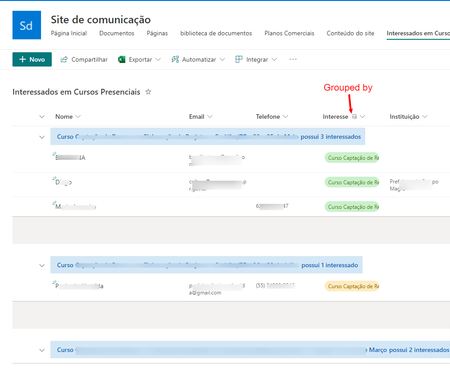
I had already done what you suggested. I applied a background color to the title, as it appears in this image.
However, what I need is to apply alternating colors depending on a part of the title string. For example, if the title contains "Curitiba" the background color must be green, if the title contains "Porto Alegre" the background color must be blue.
I tried this, but it don't works for me 
Thanks a lot for your attention.
Yeah, I completely failed to achieve your objective. Let me try again.
I was going to give you a bunch of reference links, but it looks like you have found the ROW FORMATTING / LIST VIEW CUSTOMIZATION help and have gone through it.
So I have JSON below that should help, I hope with your group header row formatting. Let's try it.
Note that the "$schema" property value for COLUMN FORMATTING is different from ROW FORMATTING. This view customization is for row formatting
{
   "$schema": "https://developer.microsoft.com/json-schemas/sp/v2/row-formatting.schema.json",
   "groupProps": {
      "headerFormatter": {
         "elmType": "div",
         "txtContent": "= @group.columnDisplayName +': ' + @group.fieldData.displayValue",
         "style": {
            "background-color": "=if(startsWith(@group.fieldData, 'abc'), '#e0ffe0', if(startsWith(@group.fieldData, 'cde'), '#ffe0e0', ''))",
            "font-weight": "bold"
         }
       }
    }
}
I developed this from reading what you did. Things to be careful about
- if you don't have 'txtContent' property set, you won't see any text. What happens above is that the column name is put, then a colon, then whatever is displayed as the value in the column that was used in the grouping (the column when you created the view)
- You want to background color set on a dependency. I used basically an Excel formula style with the allowed functions. In this case, I used the 'startsWith' string function. If you are looking for containing substring (not starting with, try 'indexOf()' function, and look for values that are not negative (-1). Your particular substring is 2nd argument in 'startsWith()'. Add any other CSS styles that you want. I had to use "font-weight":"bold" to get the boldface in the group header text
- For multiple conditions for a background color, you have to use nested if() tests. Keep track of the if() three parameters [test, true-condition, false-condition], and all the parentheses, as well as alwys using single quotes for any literal strings. Also JSON does not allow line breaks in strings, so if you have a large set if if() tests nested, join them all into one line for that string
Row and column formatting and general list customization require a lot of trial and error to figure it out. Make sure you are using the advanced mode setup with Preview/Save/Cancel editing for very quick results/testing.
If you dont see what I am seeing, reply back.