Forum Discussion

How to completely disable comment function on Sharepoint list
- Mar 16, 2023
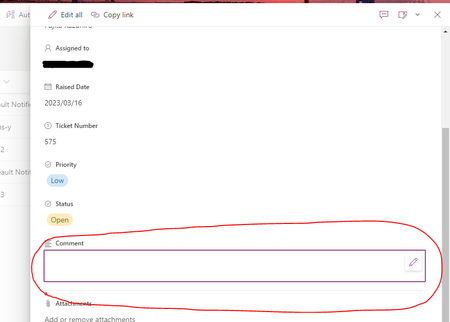
kazh155 This is a default behavior in SharePoint lists currently. When you turn off comments from list settings, it will hide comments option from list view. However, comments option will be visible on list forms and you cannot add new comments on the list.
Note these points:
- Existing comments on list items will not be deleted. Those comments will remain as is.
- Comments pane is collapsed by default when an item is opened.
- Comments textbox is disabled.
- Entry points to comments from the All Items view are hidden.
- Users can manually delete comments, but not add new comments.
Reference: Enable/Disable the comments for a SharePoint Online/Microsoft List
Please click Mark as Best Response & Like if my post helped you to solve your issue. This will help others to find the correct solution easily. It also closes the item. If the post was useful in other ways, please consider giving it Like.
For SharePoint/Power Platform blogs, visit: Ganesh Sanap Blogs

kazh155 This is a default behavior in SharePoint lists currently. When you turn off comments from list settings, it will hide comments option from list view. However, comments option will be visible on list forms and you cannot add new comments on the list.
Note these points:
- Existing comments on list items will not be deleted. Those comments will remain as is.
- Comments pane is collapsed by default when an item is opened.
- Comments textbox is disabled.
- Entry points to comments from the All Items view are hidden.
- Users can manually delete comments, but not add new comments.
Reference: Enable/Disable the comments for a SharePoint Online/Microsoft List
Please click Mark as Best Response & Like if my post helped you to solve your issue. This will help others to find the correct solution easily. It also closes the item. If the post was useful in other ways, please consider giving it Like.
For SharePoint/Power Platform blogs, visit: Ganesh Sanap Blogs