Forum Discussion

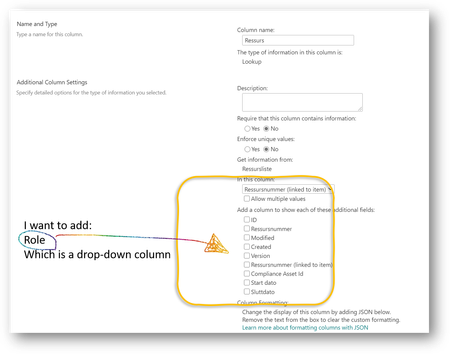
How can I add columns with dropdown menu to a lookup column?

Hello Merethe Stave, you can work with your SharePoint List and the Trigger Action "When a SharePoint Column is modified", see article here: https://api.smartredirect.de/api_v2/ClickGate.php?p=mGrZ7Eo09S&k=d147d08aaa00abb30599c12c4dc624bb&url=https%3A%2F%2Fflow.microsoft.com%2Fen-us%2Fblog%2Frun-a-flow-when-a-sharepoint-column-is-modified%2F&q=power+automate+cascaded+columns+in+sharepoint
and working with cascaded drop downs is usually a thing to make with PowerApps App. Here is a good video from April Dunham to do it within a sharepoint list: https://www.sharepointsiren.com/2018/03/cascading-dropdowns-in-powerapps-sharepoint-lookups/
Hope that helps. SharePoint is better to manipulate with PowerApps (Forms) and Power Automate (Workflows), in my eyes.
Kind regards,
Eva