Forum Discussion

Highlighted Content web part - bug with filter on pages vs. news?
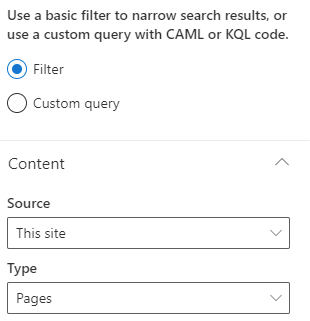

Hi AndreeS - technically News items are still pages.
While you can filter to just show News, excluding the other type of pages, the Pages option shows anything that's in the Site Pages library. I've tested in my tenant and confirm behaviour is the same. This is probably the design rather than it being a bug.
You might find you need to add a filter using managed properties so that you can exclude your news pages.
Non-news pages have a Promoted State of 0, news are 2
In the web part settings, choose a Type - Pages, then go down to Filter and change to Managed property. Search to find PromotedState, should turn up an option of PromotedStateOWSNMBR. Select this, leave filter set to Equals and then put 0 (zero) in the last field. The Highlighted content web part should then just show your non-news pages.
Screenshot of filter
- AndreeSNov 07, 2021Brass Contributor
Thanks Jenny Bruce for your explanation regarding the property PromotedState. I was aware about this property. The downside of using this property is, that actually there is no difference between a draft page or a published page - both have the value "0".
I didn't found a solution to filter for published pages only in the highlighted content webpart. 😞
However I am still believing that there is a bug in the filter value of this webpart. May I have to challenge it with Microsoft Support.
Best Regards,
André
- Jenny BruceNov 08, 2021Iron Contributor
Hi AndreeS - further on RobElliott's note about the three values for promoted state. Don't forget that only site 'members' (i.e. people with editing permissions) can see draft pages.
If you're preparing something for your read only audience they won't see draft pages even if they are showing up in the web part for you (and site members). It will take a bit of educating your site members not to be alarmed about seeing draft pages in the web part, but once you get over that hurdle you should be okay.
- RobElliottNov 08, 2021Silver Contributor
AndreeS the PromotedState values are 0 for a normal page, 1 for a draft and 2 for a published news page.
Rob
Los Gallardos
Intranet, SharePoint and Power Platform Manager (and classic 1967 Morris Traveller driver)

