Forum Discussion

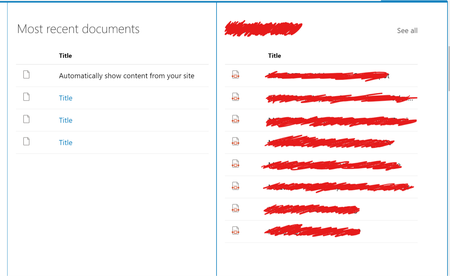
Highlighted content stops showing content from 'this site'
- Sep 04, 2019
Solved. It appeared that all of the documents libraries in the site collection had had the setting if content should be available in search turned off... No clue as to how that happened really, it needed o be manually changed in 6 different libraries so it was unlikely to be made by mistake...
Either way, turning it on and re-indexing the site solved my problem 🙂

Hi NiclasDahl,
I checked in my tenant and there is no issue - the web part displays content from "This site".
Are you using any of the "Content" and "Filter and sort" options that might be limiting your files?
If it is like you describe, I would consider contacting support.
I hope this helps.
Norm

Thanks for your reply Norman Young.
No filters or anything activated, just straight ootb web part insertion while editing the page.
I've opened up a ticket through our partner and currently waiting on a reply.
I suspect that I've manage to fiddle with the site settings somehow, since it is working on other sites in the tenant. So I just want to knwo what i've done, how I did it and how i undo it 😉
Curious though is that I can use the web part to show documents stored in other sites, on this site through the hcwp, but not from this site. So... something is up with the librarires on the site...
- NiclasDahlSep 04, 2019Brass Contributor
Solved. It appeared that all of the documents libraries in the site collection had had the setting if content should be available in search turned off... No clue as to how that happened really, it needed o be manually changed in 6 different libraries so it was unlikely to be made by mistake...
Either way, turning it on and re-indexing the site solved my problem 🙂
- Norman YoungSep 04, 2019MVPGlad to hear it is all worked out.
Norm