Forum Discussion

Hide Microsoft templates when creating a new page?
- Jan 25, 2026
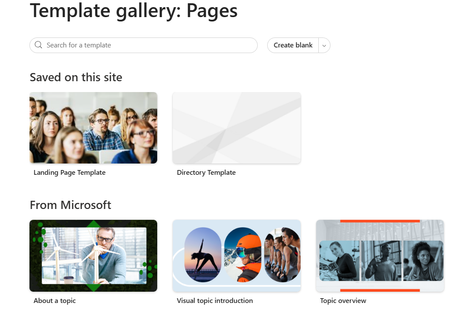
No. SharePoint Online does not provide any native feature to hide Microsoft’s built‑in page templates. There is no tenant setting, site setting, PowerShell command, or JSON customization that removes or hides the Microsoft-provided templates from the Create a page experience.
1. Use an Organization Prefix for Your Templates
Renaming your templates with a clear organizational prefix helps them stand out visually and reduces confusion.
Examples:
- \<Organization Name\> – Landing Page Template
- \<Organization Name\> – Directory Page Template
This creates a clean separation between your approved templates and Microsoft’s defaults.
2. Set a Default Page Template
Setting a default template guides users toward the correct starting point. While this does not hide Microsoft’s templates, it nudges behavior and significantly reduces the chance of users selecting the wrong one.
If my post solved your issue or answered your query, please mark it as a Solution and give it a Like.

No. SharePoint Online does not provide any native feature to hide Microsoft’s built‑in page templates. There is no tenant setting, site setting, PowerShell command, or JSON customization that removes or hides the Microsoft-provided templates from the Create a page experience.
1. Use an Organization Prefix for Your Templates
Renaming your templates with a clear organizational prefix helps them stand out visually and reduces confusion.
Examples:
- \<Organization Name\> – Landing Page Template
- \<Organization Name\> – Directory Page Template
This creates a clean separation between your approved templates and Microsoft’s defaults.
2. Set a Default Page Template
Setting a default template guides users toward the correct starting point. While this does not hide Microsoft’s templates, it nudges behavior and significantly reduces the chance of users selecting the wrong one.
If my post solved your issue or answered your query, please mark it as a Solution and give it a Like.