Forum Discussion

HERO webpart - how to stop it autosizing in smaller window
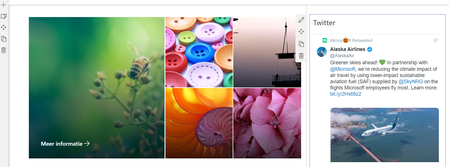
- Oct 23, 2020
Hi MagdalenaSmutek, the Hero Webpart is coded with a grid behind, but the classic code editor like SharePoint 2013 will not work, that correct. You can search for coding tips on github, to manipulate certain layouts in webparts, but you have to have developers permission to to that.
Another idea for you may be the "higlighted content webpart". You can show only your pictures in a certain (picture AND files) library, and thenspecify which pictures will be shown there, in which layout. But the responsive layout -i think it is part of the modern coding structure and you cannot manipulate it like media size, monitor size etc., as in the good old html5 times 🙂
Does that help? I personally like the new modern and very grid responsive design and it is not as static as in SharePoint 2013. Getting accustomed to the new grid styles in different devices is sometimes kind of "agile" and really not static at all, but it helps to read every text and see every picture and every monitor. Another kind of adoption challenge in my eyes...
Give a Like if my ideas can help on your issues.
Kind regards, Eva.

Hello MagdalenaSmutek ,
Instead of the Hero Webpart you can use the "Quicklinks" Webpart. In the edit pane on the right side you can change the button into Tile view, and also with full mode into your pictures. And then you can insert your hyperlinks to klick on the pics. Hope that helps. Greets, Eva.


Hallo Eva Vogel ,
Thank you for your tip and indeed it is a good solution, but from the creative point of view the quick links are nowhere near the HERO solution. See below:
They do stay on top the whole time but the pictures are not as prominent as in the HERO web part. That's why I was thinking that there may be a trick to add the pictures with links the old way - by which I mean: by hand (and code). So that the layout of the HERO web part will be the same but the picture could get smaller as the page is zoomed in or only partially showed.
If there is no other possibility we will probably go with the quick links but maybe, just maybe there is an option to overrule the settings?
- Eva VogelOct 23, 2020Steel Contributor
Hi MagdalenaSmutek, the Hero Webpart is coded with a grid behind, but the classic code editor like SharePoint 2013 will not work, that correct. You can search for coding tips on github, to manipulate certain layouts in webparts, but you have to have developers permission to to that.
Another idea for you may be the "higlighted content webpart". You can show only your pictures in a certain (picture AND files) library, and thenspecify which pictures will be shown there, in which layout. But the responsive layout -i think it is part of the modern coding structure and you cannot manipulate it like media size, monitor size etc., as in the good old html5 times 🙂
Does that help? I personally like the new modern and very grid responsive design and it is not as static as in SharePoint 2013. Getting accustomed to the new grid styles in different devices is sometimes kind of "agile" and really not static at all, but it helps to read every text and see every picture and every monitor. Another kind of adoption challenge in my eyes...
Give a Like if my ideas can help on your issues.
Kind regards, Eva.
- MagdalenaSmutekOct 25, 2020Copper Contributor
Hi Eva Vogel,
Thank you for you tips - I have now dug deeper in the Highlighted content web part and will be using it although for other purposes. In this case I also think the HERO or quicklinks are the best solutions. Also as they respond to the changes in layout. I see this as a plus, but not everybody thought that way.
I do not have the developers permissions to change the code behind the HERO web part, but maybe it is a good thing. This is after all only an internal page, not a page that is made for a customer etc.
Thanks for your advice and time!