Forum Discussion

Nov 17, 2016
Header area for Modern Pages
Why is the header so tall and empty? I know that with Delve blogs there is place for a background image and in fact is sort of expected. But I don't see the same facility for SP Modern Pages. Am...
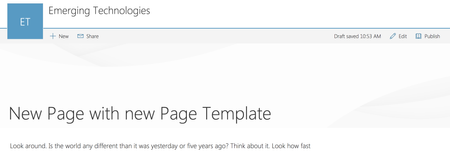

Deleted
Jun 06, 2017Perfect workaround!

Miroslav Vacura
Jun 06, 2017Copper Contributor
You can also use Powershell
1. Connect to the site:
Connect-PnPOnline https://tenant.sharepoint.com/sites/portal
2. List all pages, and find the id of the modern page:
Get-PnPListItem -List SitePages
3. Change layout from "Article" to "Home" to remove large top banner:
Set-PnPListItem -List SitePages -Identity <id> -Values @{"PageLayoutType"="Home"} Mihir YelamanchiliNov 21, 2018Brass ContributorThanks this worked.
- Tudor BrebanAug 29, 2018Copper ContributorMiroslav, this was the best solution in my opinion. Now, let's just hope MS will actually make this easier in the future.
 Joe Ayre WorkAug 07, 2018Brass Contributor
This works like a charm. Is there a way to list all the other modern page layouts?
 基樹 芹沢Nov 22, 2017Copper Contributor
I tried the powershell script to remove the header, but the 3rd script
Set-PnPListItem -List SitePages -Identity <id> -Values @{"PageLayoutType"="Home"}"
returns an error. Set-PnPListItem : Object reference not set to an instance of an object.
Also tried to modify the page code directly using SharePoint Designer, it did not work. I could not save the page, although I am the global admin of our O365 tenant.
Any special permission is required?
- Joe Ayre WorkAug 07, 2018Brass ContributorYou need to replace <id> with the id of the page you wish to change the layout of. You can get the id from the second cmd: Get-PnPListItem -List SitePages
- 基樹 芹沢Aug 07, 2018Copper ContributorThanks a lot!
Motoki
 Allen DeLaneyJun 07, 2017Copper ContributorWorked like a charm! Super easy to implement.