Forum Discussion

Ghost item in modern library on edge
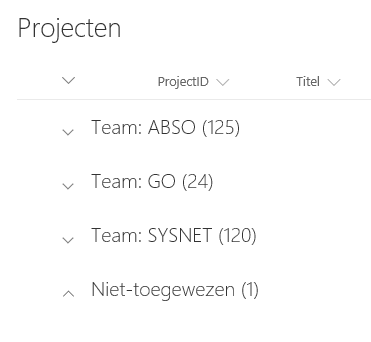

Does the item also appear when you choose a different view in the list?
Kind regards
John

Great questions John. It doesn't appear in any other views, only when grouping on this partcular field.
- John Aage AndersenMar 06, 2017Iron ContributorCan you show the list using a view that includes the affected column and do make sure that there is not filtering in the view, then try and see if the item shows up!
Also provide some information on how the affected column is defined (lookup, single line of text, etc) ?
Kindly inform about the result :)
John- bart_vermeerschMar 06, 2017Steel Contributor
Hi John, this is the exact same view (Actieve) in classic and modern layout:
There is nog filtering set on the view and the field is a mandatory choice field.
Bart
- Mar 06, 2017
Hi bart_vermeersch,
Ho wmany items are there in the list ( when you go to the site contents what is the number of items displayed). It looks a bit like a publishing/checkin issue. I'm assuming that you are logged in as the same use user in both cases.
Would you be able to run PowerShell to get all list items in your list?
Using PnP PowerShell you could run a script to check all the lists items.
So something like this (untested):
$web = Get-PnPWeb
$web.Context.Load($web.Lists)
$web.Context.ExecuteQuery()
$list = $web.GetList("List name")
[Microsoft.SharePoint.Client.CamlQuery] $query = New-Object -TypeName Microsoft.SharePoint.Client.CamlQuery
$query.ViewXml = "<View><Query><Where><Gt><FieldRef Name='Id'/><Value Type=''>0</Value></Gt></Where></Query></View>";
$items = $list.GetItems(query)
- bart_vermeerschMar 06, 2017Steel Contributor
Hi John, this is the exact same view in classic view:
