Forum Discussion

TheNoobOfSP
Aug 19, 2025Copper Contributor
Getting total percentages from text fields
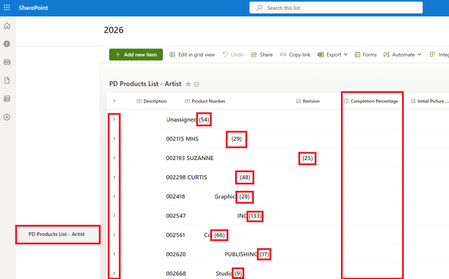
I have it working to a point, but I am a little stuck as to how to show the "total percentage of completion" on the main "list" screen. Below is my main list screen, with none of the items in the l...

PankajBadoni
Aug 20, 2025Iron Contributor
In my opinion, using a Calculated Column may not work for this scenario.
Alternative approach:
- Create a new column, number field (e.g., "Percentage").
- Use Power Automate to populate this column whenever the Stage column changes for an item.
- Edit the list view and, under the Totals section, set the Sum option for this new column.
- Apply the following JSON formatting to the view. Be sure to replace "Percentage" with the internal name of your new column:
{
"$schema": "https://developer.microsoft.com/json-schemas/sp/v2/row-formatting.schema.json",
"groupProps": {
"headerFormatter": {
"elmType": "div",
"style": {
"display": "flex",
"justify-content": "space-between",
"padding": "8px",
"background-color": "#f3f3f3",
"font-weight": "bold"
},
"children": [
{
"elmType": "span",
"style": {
"margin-right": "20px"
},
"txtContent": "@group.fieldData.displayValue"
},
{
"forEach": "agg in @aggregates",
"elmType": "span",
"txtContent": "= 'Total Percentage: ' + [$agg.value]"
}
]
}
}
}